
Practical AI · 6 min read
Get AI to write the way you want
Give the AI examples, explain what you like about them, and revise the output with precise feedback. You can use your own writing or references you admire. The goal is a result that fits your audience and purpose, with your facts and point of view.
Give the AI examples, explain what you like about them, and revise the output with precise feedback. You can use your own writing or references you admire. The goal is a result that fits your audience and purpose, with your facts and point of view.
This walkthrough creates a short fictional workshop announcement. It shows why examples alone are only the beginning: the first draft followed the facts but sounded like a catalog entry. Specific feedback improved the opening, structure and conversational feel.
1. Choose examples that fit the job
A good social post and a good internal policy use different writing. Pick two or three examples close to the output you need. For work, use approved documents or emails. For social media, use posts whose explanation, pace or structure you genuinely like.
If you do not have examples ready, name creators, publications or a niche and ask an AI with web access to find candidates. Require direct links and a short explanation of what each example does well. Open the originals before selecting them. A search result may not expose the full post, and visible engagement does not prove the writing caused the performance.
Find a few public examples of clear, practical writing about [topic] for [audience]. Start with [people or publications]. Link the original posts, summarize their subject and highlight useful writing choices. Tell me what you could inspect. Do not label them the best-performing posts without visible evidence.
Select the references yourself. Explain whether you like their opening, specificity, sentence rhythm, humor, structure or level of detail. “I like this” is useful; “I like how it explains the process through one concrete example” is more actionable.
2. Keep style examples separate from facts
The demonstration supplied two original fictional examples with a warm, practical voice. The AI was told to treat them as tone references, not as claims to reuse. The workshop facts remained the factual source.
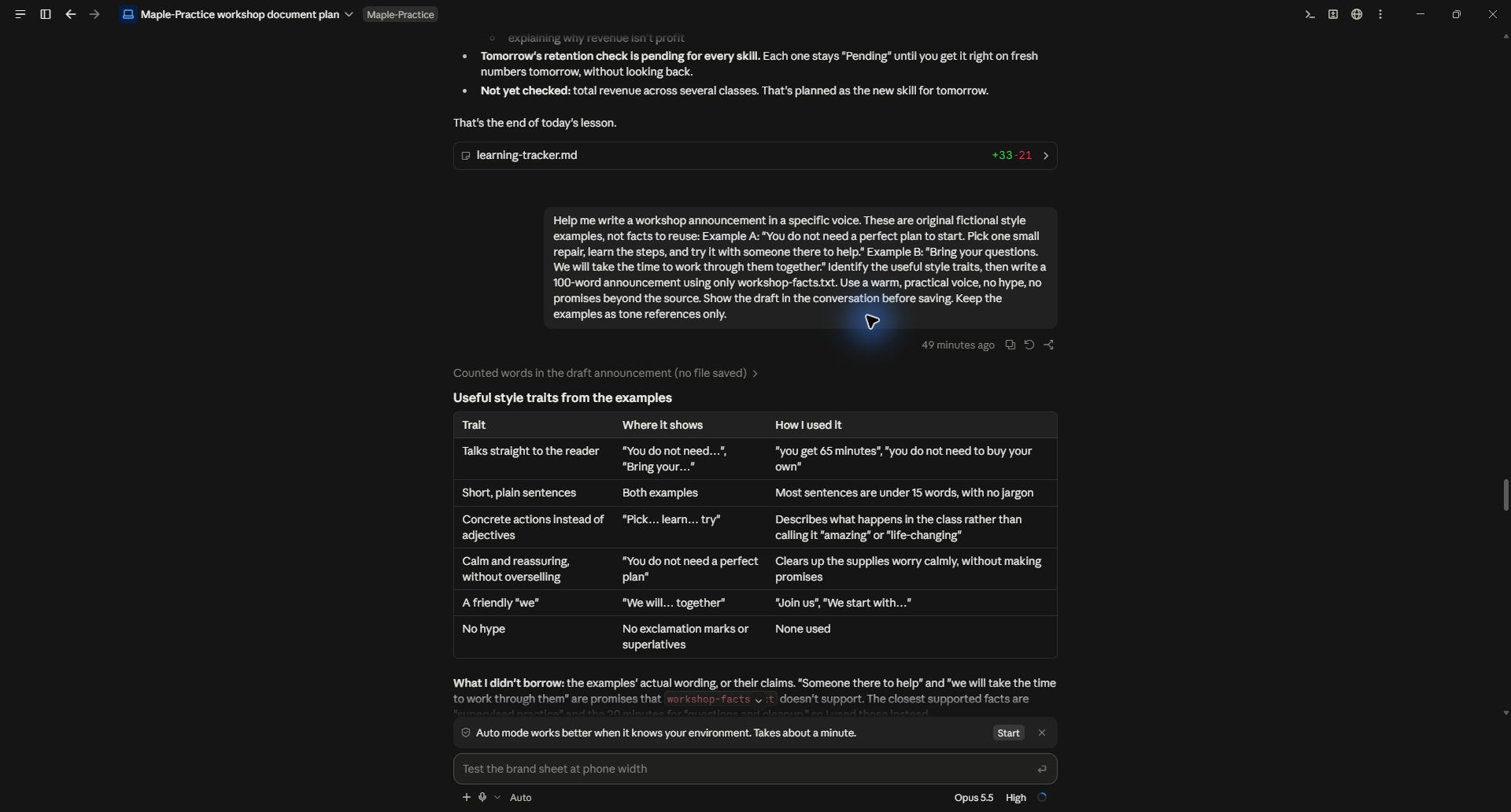
This separation prevents a subtle problem: a reference may promise personal help, fast results or a service your business does not offer. Borrowing its tone should not import those promises.
Identify the useful style traits in these examples, then write an announcement using only the attached facts. Use a warm, practical voice and no hype. Keep the examples as tone references only. Show the draft before saving it.
For someone else's writing, adapt general techniques rather than copying distinctive sentences. Bring your own experience, examples and reasoning into the piece.
3. Read the draft as something you would say
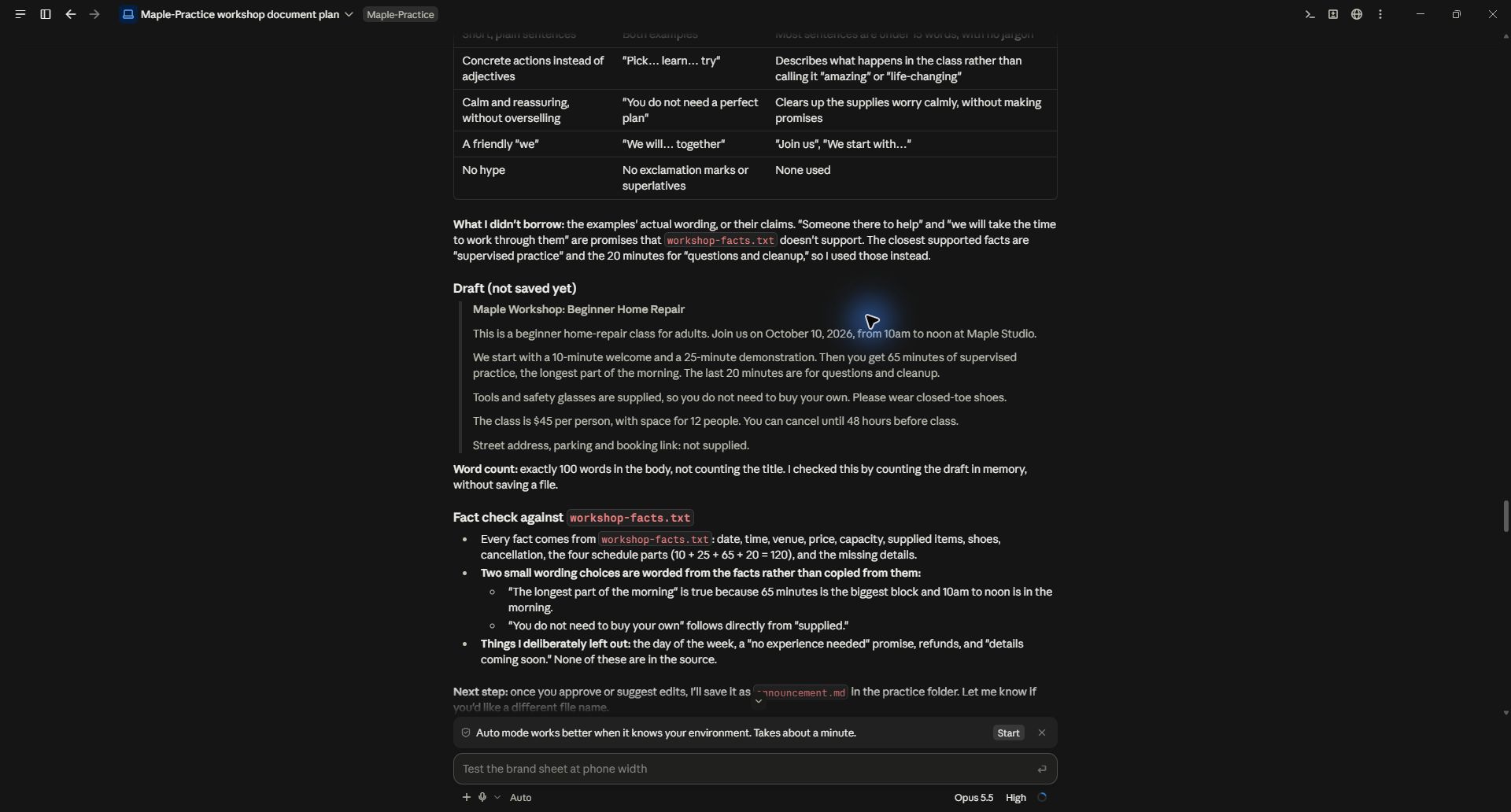
The first draft opened, “This is a beginner home-repair class for adults.” It included every schedule segment and placed missing address and booking details inside the public copy. It was accurate in many respects, but its structure did not match the desired announcement.
Read it aloud. Mark where you would naturally phrase something differently. Do not settle for broad labels such as “too AI” or “more human.” Those labels do not tell the model what to change.
Identify the actual issue: an abstract opening, too much context before the useful point, repetitive sentence structure, an awkward transition, or a phrase you would never say. Keep anything that already works.
4. Give feedback at the level of the problem
The correction said the opening sounded like a catalog entry and should start with the practical experience. It removed the full minute-by-minute schedule, kept the overall time and 65-minute practice session, requested natural contractions, grouped the logistics, and moved missing details into an editorial note.
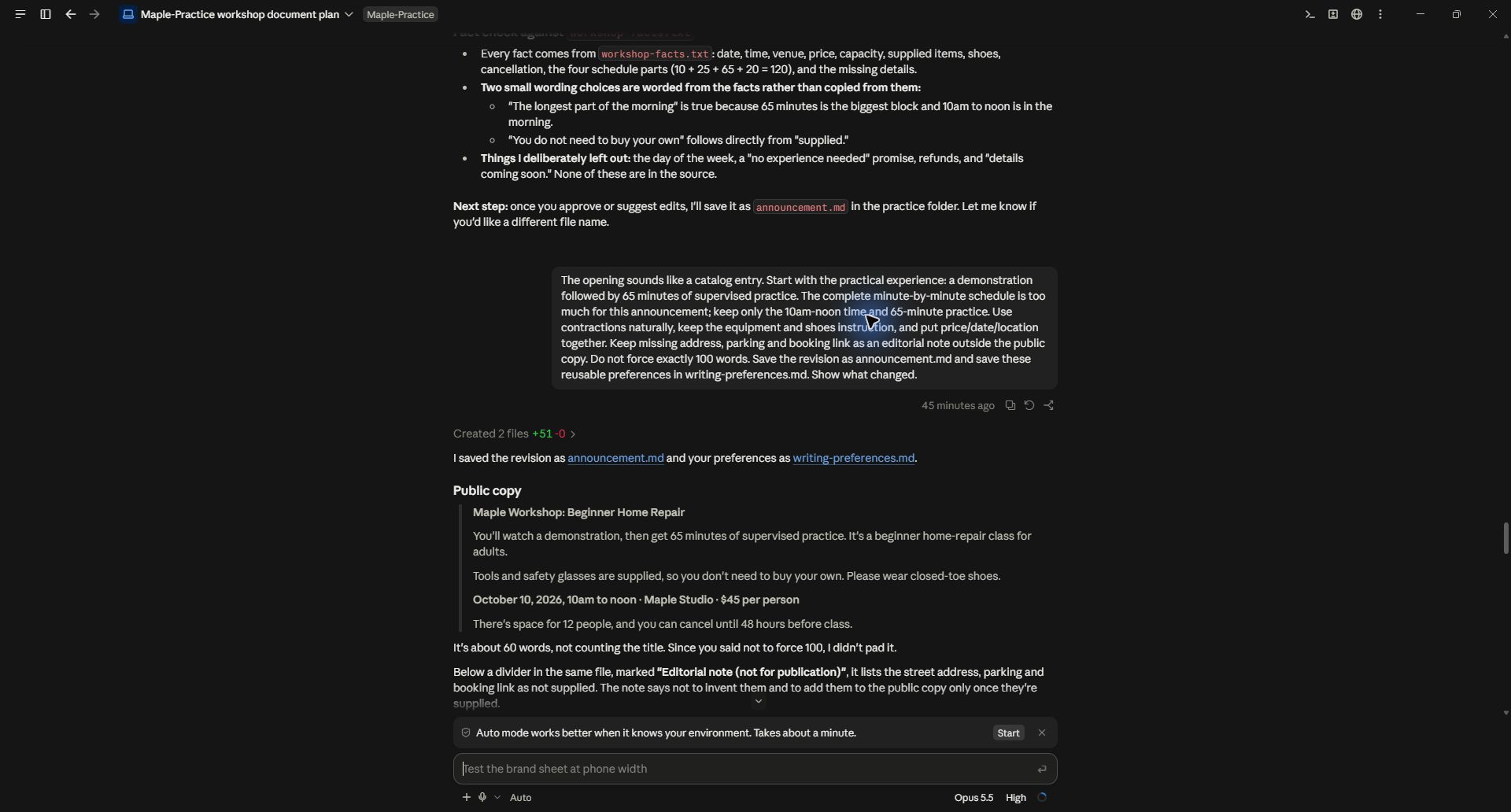
Notice that the feedback did not simply say “shorter.” It explained which detail belonged elsewhere and which detail mattered to the reader. That helps preserve substance while improving the flow.
For your own piece, try: “The first two sentences delay the useful point. Start with the action in paragraph two. Keep the example and the specific steps. Remove the generic conclusion. Use the phrase I supplied instead of this formal wording.”
Revise a few meaningful issues at a time. If you dislike nearly everything, reset the direction with a better reference and a short explanation rather than adding twenty contradictory rules.
5. Compare the revision with the brief
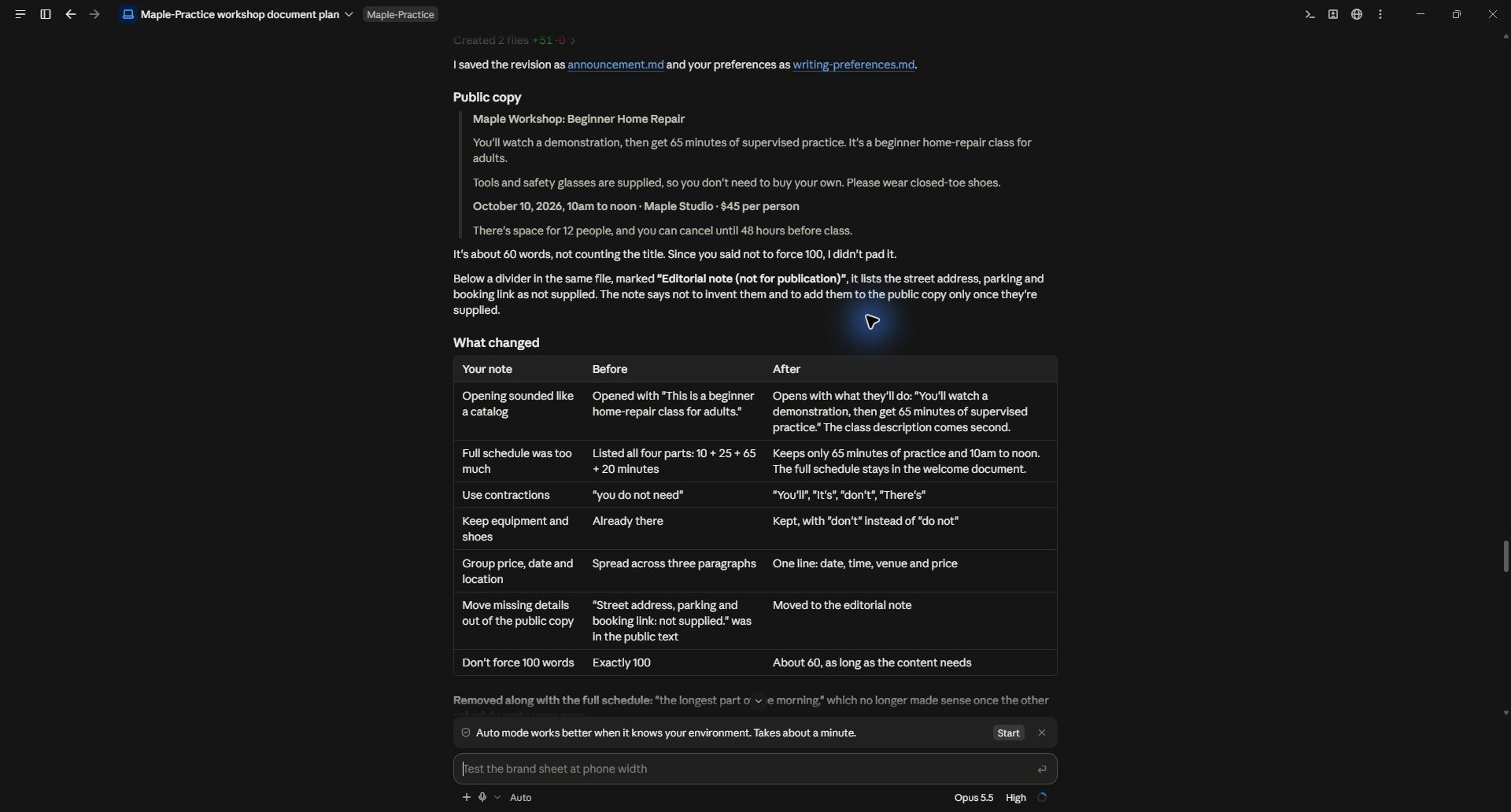
The revised copy starts with watching a demonstration and getting 65 minutes of supervised practice. It keeps the equipment instruction and groups the date, time, venue and price. It is shorter because unnecessary schedule detail was removed, not because complete thoughts were chopped apart.
Check that revision did not introduce new claims or drop an important condition. Editing for tone can accidentally change meaning. Compare names, numbers, promises and requirements with the source facts again.
You can ask for two alternatives when a line still feels wrong, but do not generate endless versions without making a choice. Your selection teaches the direction more clearly than another vague rewrite request.
6. Save the preferences that generalize
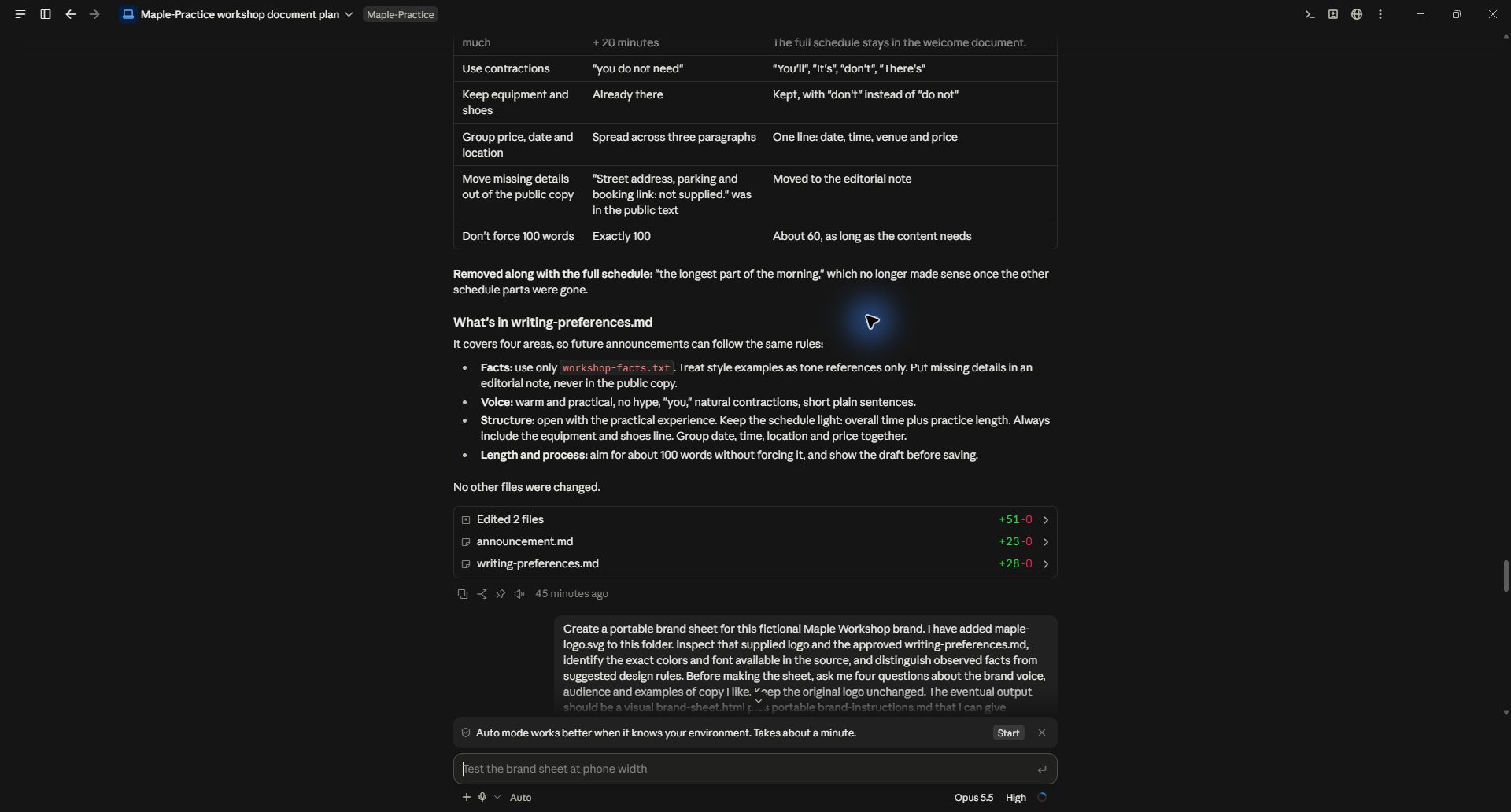
The actual run saved an announcement and a preferences file. Useful rules included leading with the practical experience, using natural contractions, avoiding hype and keeping factual sources separate from style references.
Review those saved rules too. A preference suited to a short announcement may not fit a technical document or a long educational script. Label the intended format rather than turning every one-off correction into a universal rule.
Keep a few approved examples alongside the instructions. In a future project, ask the AI to summarize the relevant preferences before drafting. Continue giving exact feedback as your style develops.
Practice files and demonstrated scope
Read the revised announcement and saved writing preferences. The screenshots show an actual Claude Code exchange on September 28, 2026. The examples and workshop are fictional. The workflow demonstrates drafting and revision; it does not claim improved engagement or audience performance.
Keep a copy of the guide
Download the PDF to keep the steps and prompts handy while you work.