
Practical AI · 6 min read
Learn something with AI and check that you understand it
By Hank BarkerPublished
Use AI to build a learning path, explain difficult ideas in different ways, give you practice and keep track of what you can do. The useful test is whether you can apply the idea yourself after the explanation.
Use AI to build a learning path, explain difficult ideas in different ways, give you practice and keep track of what you can do. The useful test is whether you can apply the idea yourself after the explanation.
This walkthrough teaches a beginner to read a simple revenue table. It includes a deliberately incorrect answer, the AI's correction, a new exercise and a saved progress record. The same structure can support other subjects, with trustworthy resources and an appropriate way to check the work.
1. Define the skill, your starting point and your time
“Teach me business” is too broad for a useful first session. “Help me calculate revenue from a small table and explain why revenue is different from profit” gives the lesson a finish line.
Tell the AI what you already know, how you prefer to learn and how much time you have. Ask it to diagnose your starting point before giving you a long plan. Our example uses 15 minutes today and 10 minutes tomorrow. Those are planned sessions, not a measured promise about how quickly someone will learn.
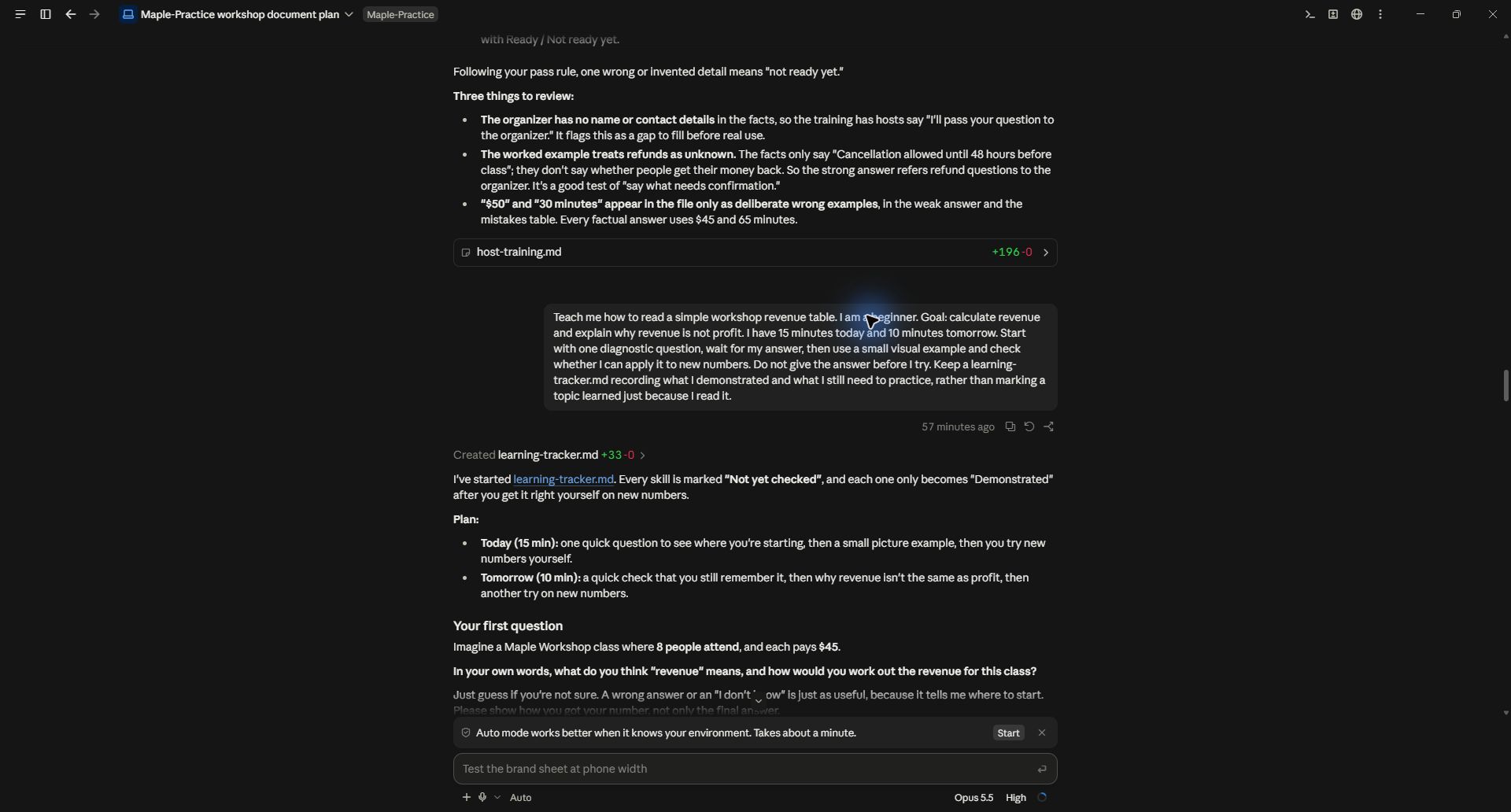
Teach me how to read a simple workshop revenue table. I am a beginner. Goal: calculate revenue and explain why revenue is not profit. I have 15 minutes today and 10 minutes tomorrow. Start with one diagnostic question, wait for my answer, then use a small visual example and check whether I can apply it to new numbers. Do not give the answer before I try. Keep a learning tracker recording what I demonstrated and what I still need to practice, rather than marking a topic learned just because I read it.
2. Answer the diagnostic honestly
Claude asked what revenue means and how to calculate it for eight people paying $45. It did not reveal the answer before the attempt. It also created a tracker with skills marked “Not yet checked.”
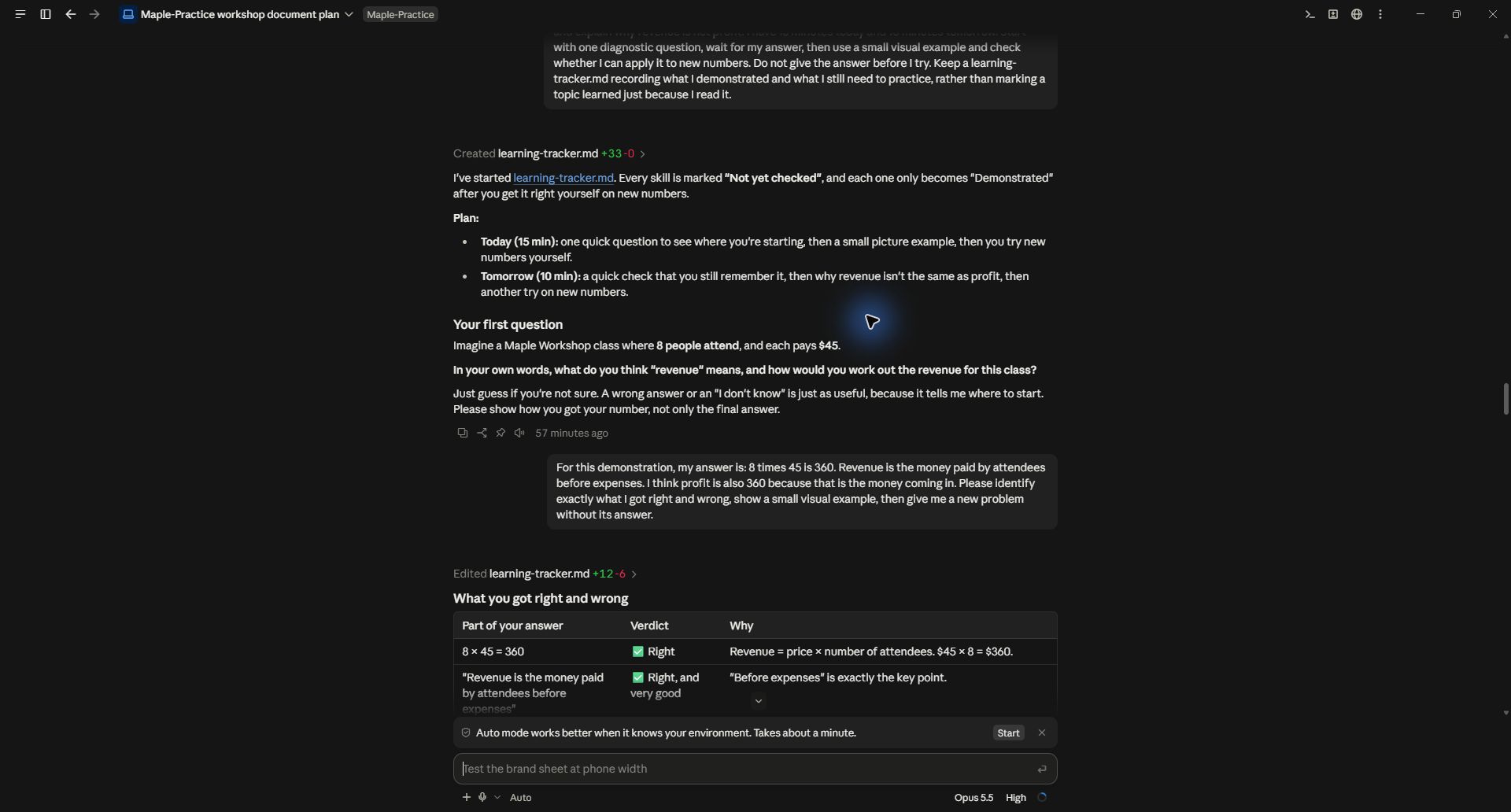
For the demonstration, the answer correctly calculated 8 times 45 as 360 and defined revenue as money before expenses, but then incorrectly called the same $360 profit. That gives the tutor a specific misunderstanding to address.
When learning for yourself, explain your reasoning even if you are unsure. A correct number with the wrong reasoning needs a different response from a simple arithmetic slip. Ask the AI to identify what you got right before explaining the error.
3. Ask for an explanation that makes the difference visible
Claude used a small table comparing classes with revenue, costs and profit. One class received money but still lost money because costs exceeded revenue. That example made the distinction concrete.
You can request a diagram, a worked example, an analogy or a side-by-side comparison. Tell the AI what remains confusing: “I understand the multiplication, but I still do not see why money coming in can coexist with a loss.” Specific confusion is easier to teach than “explain better.”
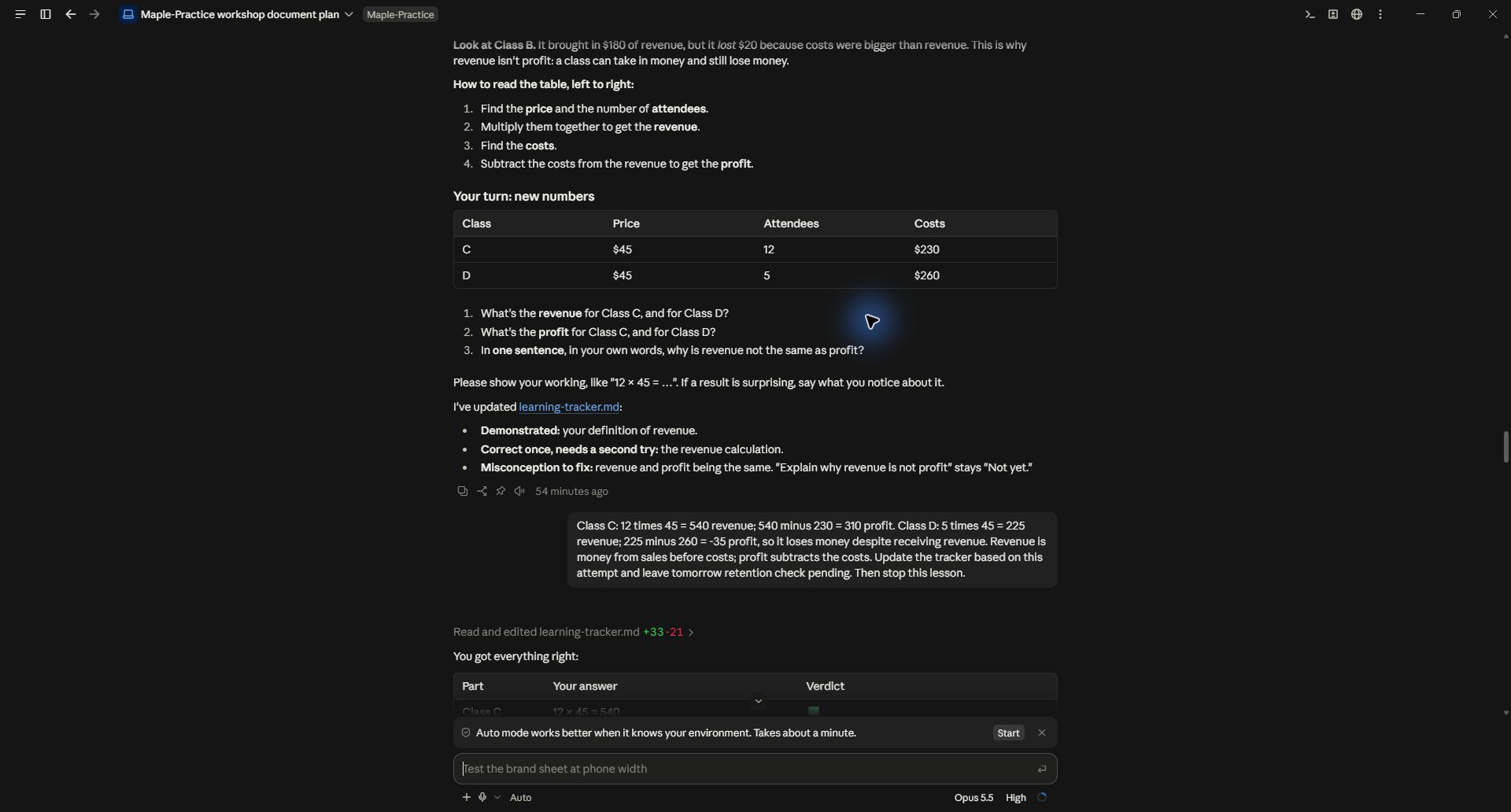
The new exercise asks for revenue, profit and a one-sentence explanation without showing its answer first.
Visuals should explain the concept, not merely decorate the lesson. For a process, ask for a flow diagram. For a comparison, ask for contrasting examples. For a calculation, show how the inputs lead to the result. Check the visual's labels and arithmetic against a reliable source or calculation.
4. Apply the idea to a new case
The next exercise used Class C with 12 attendees at $45 and $230 costs, and Class D with five attendees at $45 and $260 costs. The submitted answers were $540 revenue and $310 profit for C, and $225 revenue with a $35 loss for D.
The explanation then stated the distinction in ordinary language: revenue is sales money before costs; profit subtracts costs. This demonstrates application within the example. It does not establish long-term retention or expertise in accounting.
For other topics, ask the AI to change the situation enough that you cannot succeed by copying the previous answer. If it gives hints, record that. “Solved independently” and “solved after a hint” are different kinds of evidence.
5. Save progress and return to it
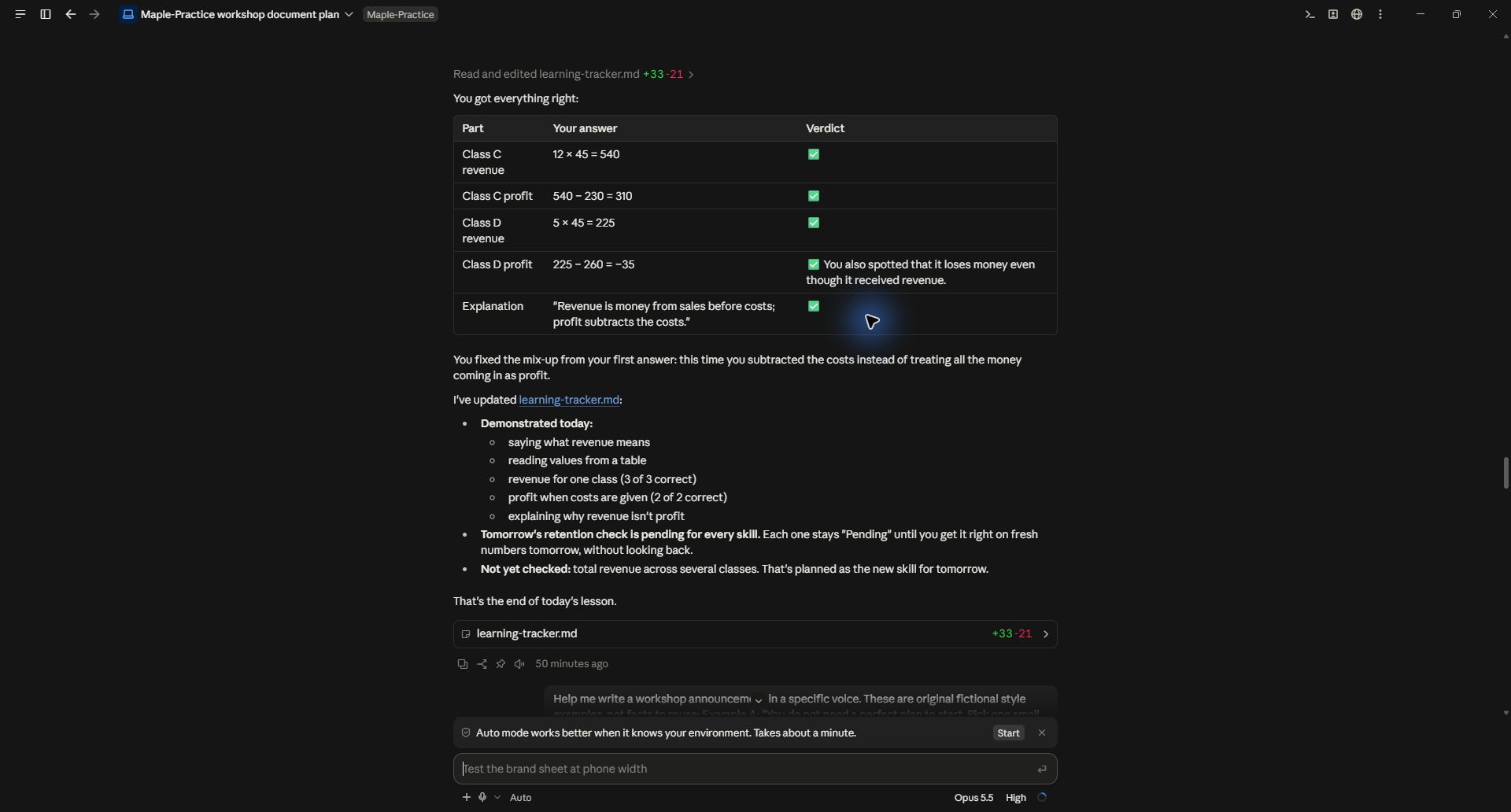
Claude updated the tracker with the attempted calculations and the corrected misconception. The next-day check remains pending, and totaling revenue across several classes remains untested. That is more useful than a generic “Great job, you understand this now.”
Save a learning record with the topic, attempted task, answer, feedback, remaining confusion and next practice date. If the tool cannot reliably retain the record between conversations, download it and supply it at the start of the next session.
Use this tracker to give me a fresh check without showing the previous solution. Do not mark a skill as retained until I answer. If I struggle, explain the specific gap and give me one more different example.
6. Build a resource path for a larger subject
For a longer learning goal, ask for a sequence of concepts and a small number of trustworthy resources for each. The AI can help find articles, documentation, courses and YouTube videos when it has web access. Require direct links, the reason each resource is useful, and whether it inspected the full content or only a summary.
Do not accept invented video titles or a huge reading list as a learning plan. Open the links and confirm that they teach the intended skill at your level. Combine a resource with a task: watch the explanation, attempt something yourself, then get feedback.
For subjects where wrong instructions can cause harm, use qualified teaching and authoritative materials. AI explanations and quizzes are useful support, but the fact that an answer sounds clear does not make it correct.
Practice record and demonstrated scope
Download the actual learning tracker. The screenshots show a real Claude Code conversation using a simulated beginner answer on September 28, 2026. No real learner was assessed, and the next-day retention check has not been performed. You can use the same prompts in a chat tool and ask for a downloadable tracker instead of a local file.
Keep a copy of the guide
Download the PDF to keep the steps and prompts handy while you work.
Put this to work with your team
I’m Hank Barker, founder of PriorAIty. I help Michigan teams build useful AI habits through hands-on training and adoption consulting, with in-person and virtual options.
Keep going
- Use ChatGPT, Claude or Copilot inside Excel
Open a copy of a workbook, ask the AI to explain its structure, then give it one specific change. Once you can check that change, move on to a summary, PivotTable or chart. This guide covers the three setup routes and gives you a small workbook with answers you can verify yourself.
- Make your AI designs and writing match your brand
Give an AI your real logo, a few designs you like and examples of your writing. Have it identify the choices already present, ask about the choices that are missing, and turn your answers into a brand sheet plus instructions you can reuse. The example here is a fictional workshop business. The screenshots show the actual source review, interview and resulting files.
- Get started with ChatGPT Work
Give Work a concrete assignment, inspect the file it produces, and refine it in the same conversation. This walkthrough starts with a small set of fictional workshop facts and ends with an editable Word checklist. It also shows a real first-draft mistake and the correction that fixed it.
Weekly AI guide
The Weekly AI Guide
One genuinely useful AI use case a week, whatever news matters, and what I've got coming up: free sessions, new guides, upcoming trainings.