
Practical AI · 5 min read
Turn customer feedback into improvements you can explain
By Hank BarkerPublished
Start with what people said, find the recurring issues, and connect each recommendation to its evidence. This walkthrough uses six fictional workshop comments and a current facts sheet. The result is a feedback analysis you can inspect, rather than a list of plausible business advice.
Start with what people said, find the recurring issues, and connect each recommendation to its evidence. This walkthrough uses six fictional workshop comments and a current facts sheet. The result is a feedback analysis you can inspect, rather than a list of plausible business advice.
1. Prepare the feedback so you can trace it
Export reviews, survey responses, support notes or customer emails into a simple table. Keep one response per row, with an ID, the comment, and any useful date or product context. Remove personal details that are unnecessary for the analysis. Keep an untouched copy of the export.
The practice CSV has IDs F01 through F06. Two people were unclear about supplied equipment, two wanted preparation information, and two wanted more practice. Some comments also contain praise. These are overlapping themes, not six neatly separated categories.
For a real business, include the relevant product version or date when available. A complaint about last year's process may already be fixed. Without that context, an AI can correctly summarize a complaint and still recommend solving an outdated problem.
2. Give the AI the feedback and the current context
In the demonstrated route, Claude Code has access to a dedicated practice folder containing the CSV and current workshop facts. You can also attach these files to ChatGPT Work or Claude. Use the file route available in your account; the analytical request is the same.
Ask for themes, counts, original evidence and recommendations separately:
Analyze customer-feedback.csv. Create feedback-analysis.md with themes, number of distinct comments per theme, exact short supporting quotes and comment IDs, and one proposed improvement per theme. Six comments are a small sample, so do not generalize to all customers. Distinguish requests from confirmed workshop policy. Identify which improvements the welcome document already addresses and which need a human decision. Show the evidence table in your reply. Do not change any existing files.
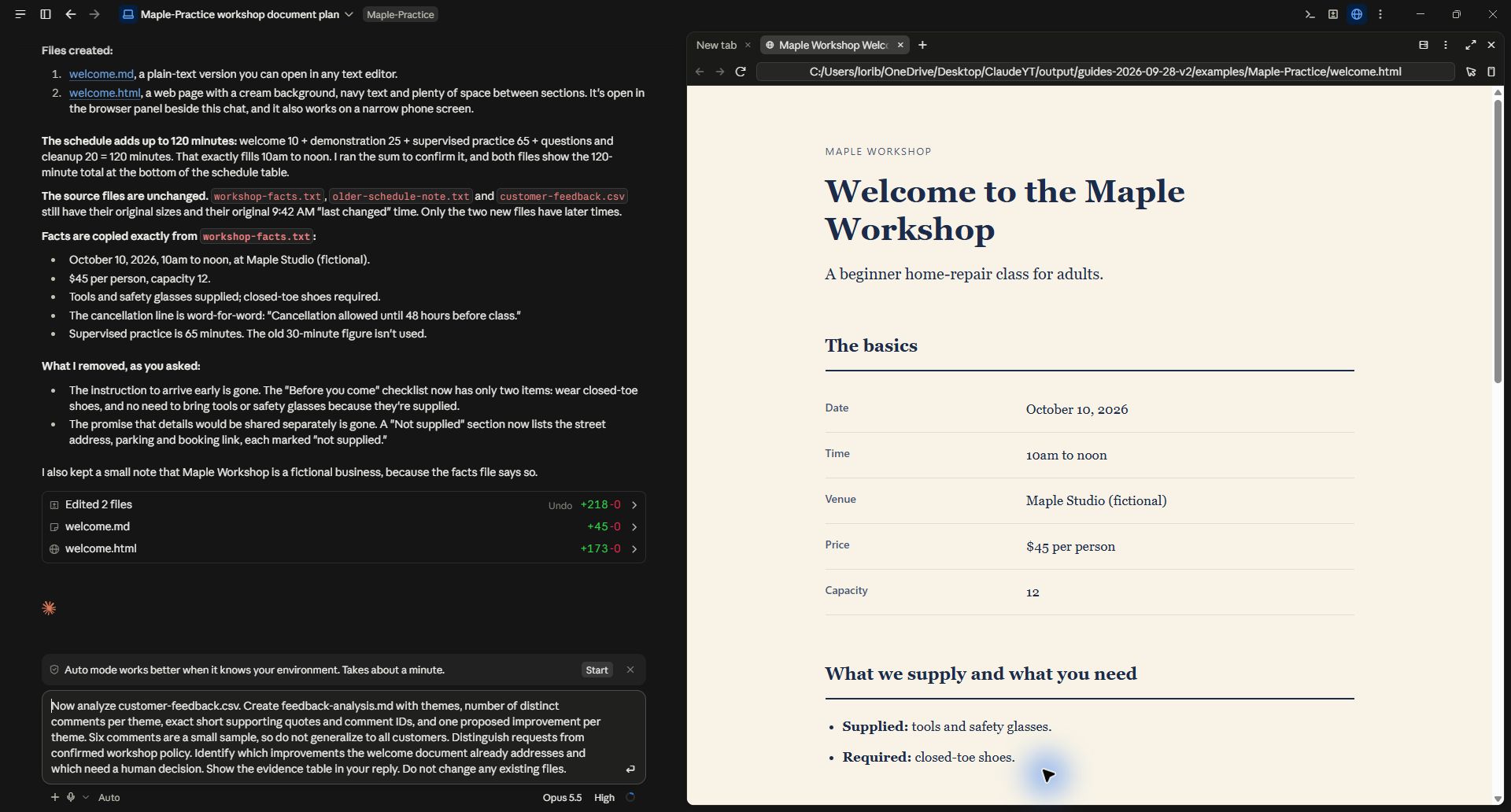
The request names the actual file, the evidence required, and the decision the analysis should support.
3. Check the themes against the comments
The response grouped equipment clarity under F01 and F04. One comment said, “I did not know whether tools were included.” Another described buying safety glasses because the attendee did not know they were supplied. Those comments support an improvement to pre-class communication. They do not support changing the equipment policy, which already says tools and glasses are provided.
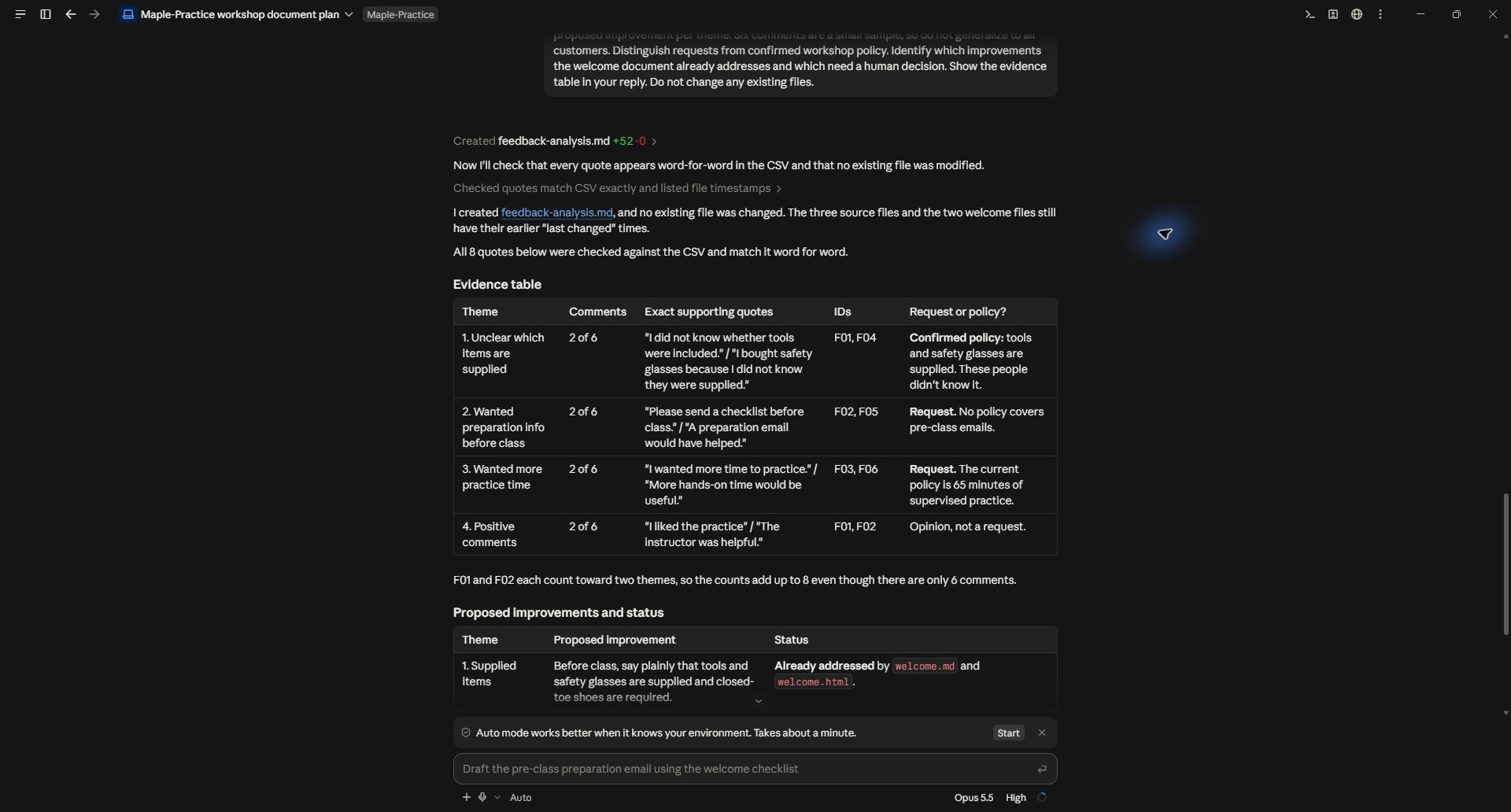
Each theme has two of six comments. F01 and F02 also contain positive feedback, so theme counts overlap.
Open the CSV and verify each quoted passage and ID. Count distinct responses within a theme, rather than counting every sentence as a different customer. If the AI reports percentages, ask it to show the numerator and denominator. With this sample, “two of six comments” communicates the evidence more clearly than an impressive-looking percentage.
A useful correction request is: “F01 contains both praise and a complaint. Keep both, count the response once within each theme, and explain that categories overlap.” Never force mixed comments into a single sentiment label just to make the chart look tidy.
4. Separate the finding from the decision
The actual analysis proposed clearer equipment instructions and a preparation checklist. It also suggested reviewing practice time. That last item needs more context: the current schedule already has 65 minutes of practice, while an older note says 30. The comments have no dates, so we cannot tell which schedule the attendees experienced.
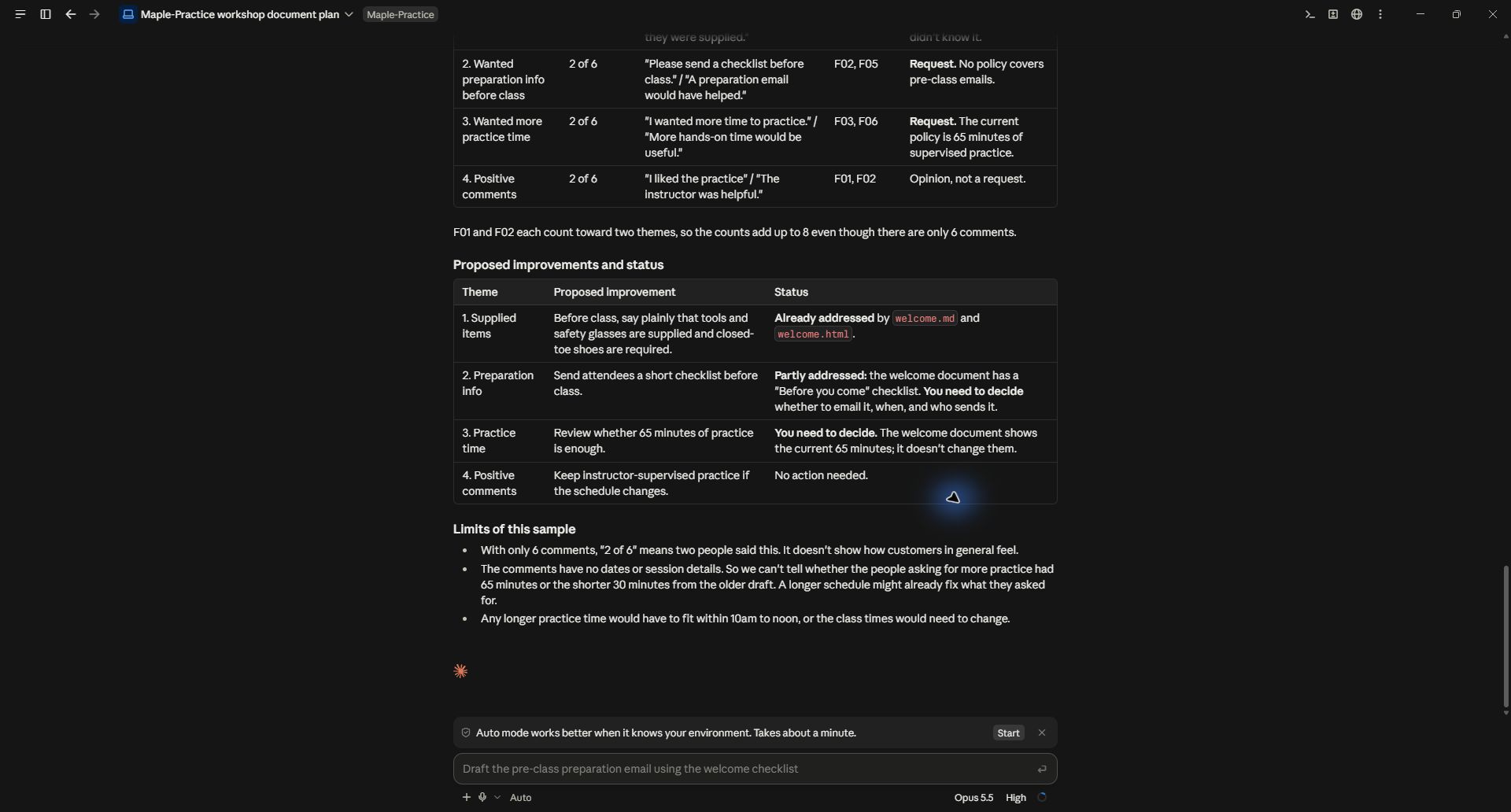
The output distinguishes changes already covered by the welcome document from decisions the organizer still needs to make.
For your own analysis, add an action table with the recommendation, supporting IDs, expected benefit, effort, owner and open question. Have the AI leave unknown owner or effort fields unfilled instead of guessing. Prioritize problems you can substantiate and act on.
Turn the verified findings into an action list. Separate quick communication fixes from changes that need more research. Do not treat the number of mentions as proof of severity. Show what evidence would change each recommendation.
5. Apply one improvement and review it
Choose a small, specific change first. For Maple Workshop, the welcome document can state that tools and safety glasses are supplied and that attendees should wear closed-toe shoes. That directly addresses a documented confusion without inventing a new policy.
If you want the AI to revise a document, identify the exact file and ask for a new version. Compare it with the current policy. Feedback should inform the rewrite; it should not silently become the source of truth for dates, prices or promises.
After the change has been used, gather new feedback using the same question and preserve dates. That makes a later comparison more meaningful. AI can help organize the evidence, but six comments cannot establish a business-wide trend or prove that a change caused an improvement.
Practice files and demonstrated scope
Use the six-comment CSV, current workshop facts, and the actual analysis. All data is fictional. The screenshots show a real Claude Code run on September 28, 2026. The example demonstrates grouping, evidence tracing and recommendations, not a customer survey or measured business outcome.
Keep a copy of the guide
Download the PDF to keep the steps and prompts handy while you work.
Put this to work with your team
I’m Hank Barker, founder of PriorAIty. I help Michigan teams build useful AI habits through hands-on training and adoption consulting, with in-person and virtual options.
Keep going
- Use ChatGPT, Claude or Copilot inside Excel
Open a copy of a workbook, ask the AI to explain its structure, then give it one specific change. Once you can check that change, move on to a summary, PivotTable or chart. This guide covers the three setup routes and gives you a small workbook with answers you can verify yourself.
- Make your AI designs and writing match your brand
Give an AI your real logo, a few designs you like and examples of your writing. Have it identify the choices already present, ask about the choices that are missing, and turn your answers into a brand sheet plus instructions you can reuse. The example here is a fictional workshop business. The screenshots show the actual source review, interview and resulting files.
- Get started with ChatGPT Work
Give Work a concrete assignment, inspect the file it produces, and refine it in the same conversation. This walkthrough starts with a small set of fictional workshop facts and ends with an editable Word checklist. It also shows a real first-draft mistake and the correction that fixed it.
Weekly AI guide
The Weekly AI Guide
One genuinely useful AI use case a week, whatever news matters, and what I've got coming up: free sessions, new guides, upcoming trainings.