
Practical AI · 6 min read
Get useful feedback from AI on your work
By Hank BarkerPublished
Give the AI the work, the audience, the goal and the standard you want it checked against. Then ask it to quote the problems and prioritize fixes before rewriting. This walkthrough uses a deliberately flawed workshop announcement and shows the actual critique and corrected version from ChatGPT Work.
Give the AI the work, the audience, the goal and the standard you want it checked against. Then ask it to quote the problems and prioritize fixes before rewriting. This walkthrough uses a deliberately flawed workshop announcement and shows the actual critique and corrected version from ChatGPT Work.
1. Give it something concrete to judge
“What do you think?” often produces a broad reaction. A useful review has a clear job. Our announcement is intended to help first-time attendees understand a class and prepare for it. We supplied the confirmed workshop facts in the conversation and asked for accuracy, clarity, missing information and tone.
The deliberately flawed draft was:
Unlock your potential at Maple Studio! Our guaranteed expert training costs $50 and includes 30 minutes of practice. Buy your own safety glasses and meet us at 123 Main Street. Book now before the last places disappear.
The reference facts say $45, 65 minutes of supervised practice, supplied tools and safety glasses, and required closed-toe shoes. No street address, booking link, guarantee or current availability was supplied. The example is fictional; the errors were planted to make the review easy to assess.
For your own work, provide the relevant standard. That could be the project brief, approved facts, audience requirements, a scoring rubric or an example of the quality you want. Without it, the AI may substitute its own preferences for your goal.
2. Request a critique before a rewrite
Review this announcement for first-time attendees. The goal is to help them understand the class and prepare. Check factual accuracy against the confirmed facts, clarity, missing information and tone. Quote the exact problem phrases, explain why each matters and recommend the three highest-priority fixes. Do not rewrite yet.
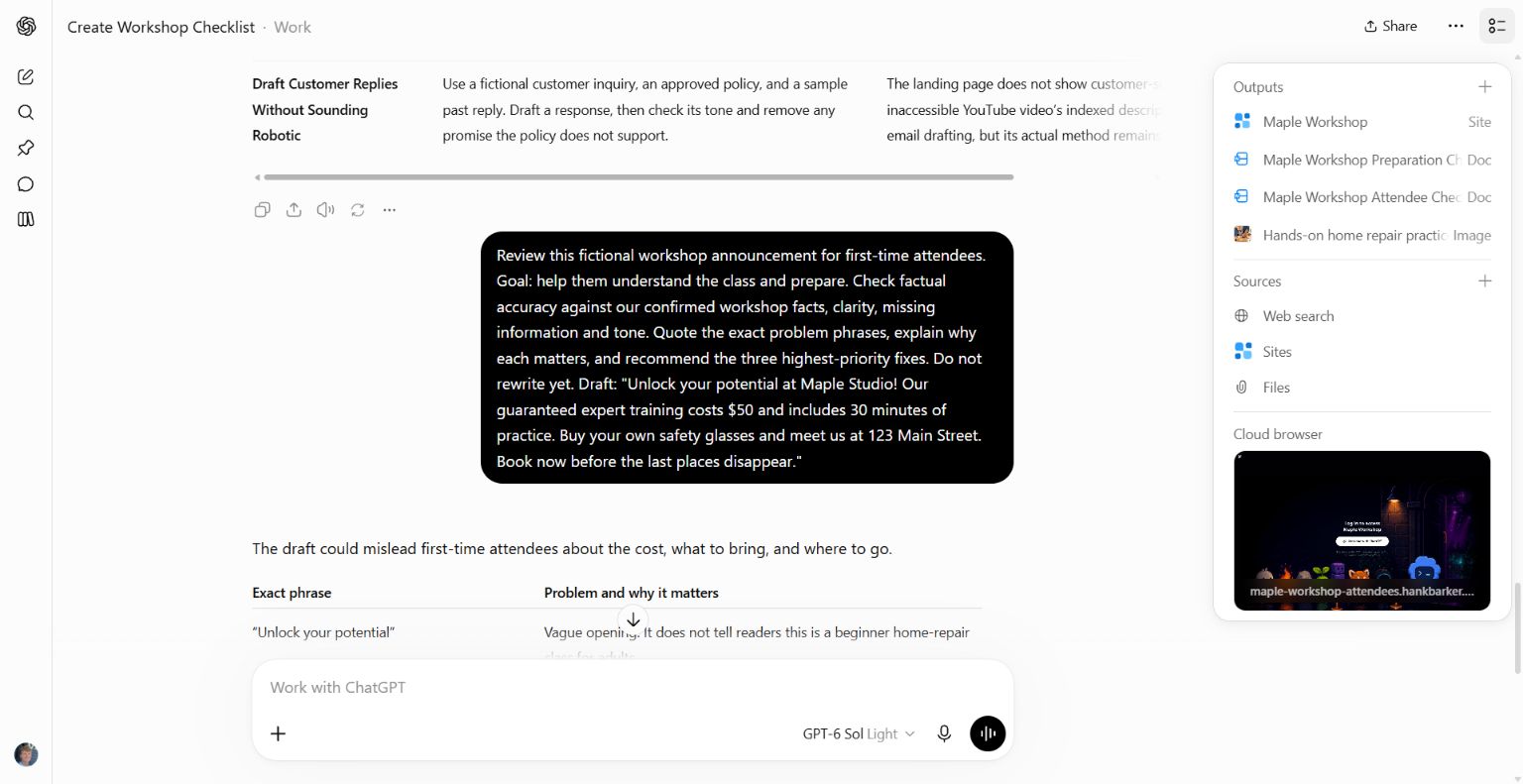
The request includes the audience, purpose, criteria, flawed draft and a limit of three priority fixes.
The real response identified the wrong price and practice time, the incorrect instruction to buy glasses, and the invented address. It also flagged the unsupported guarantee and scarcity claim. Those are useful findings because each one points to a specific phrase and explains a reader-facing consequence.
Ask for fewer priorities when you need to act quickly. A list of 25 equally weighted suggestions is difficult to use. In this example, correcting misleading logistics matters more than polishing the opening line.
3. Separate factual problems from preferences
“The price contradicts the facts” is different from “the opening sounds promotional.” The first can be checked against a source. The second depends on the voice and purpose you want.
You can make that distinction explicit:
Label each finding as a factual error, a missing requirement or an editorial suggestion. For factual errors, name the source. For suggestions, explain the benefit and what might be lost if I apply them.
That is a suggested follow-up you can use with your own work. It is especially helpful when an AI wants to make everything more formal or concise even though you prefer a conversational style. You do not have to accept every suggestion to benefit from the review.
In our example, “Unlock your potential” is vague relative to the practical goal. The invented street address is a more serious problem because it could send someone to the wrong place. Treating those as equivalent would make the review less useful.
4. Choose the changes, then ask for the revision
After reading the critique, we asked it to apply the three priority fixes in a calm, practical voice, at about 90 words. We also asked it to keep missing details in a separate editorial note and list its factual corrections.
Apply those three fixes. Write the announcement in a calm, practical voice, about 90 words. Keep missing details in a separate editorial note, not in attendee copy. Then list the factual corrections you made so I can check them against the source.
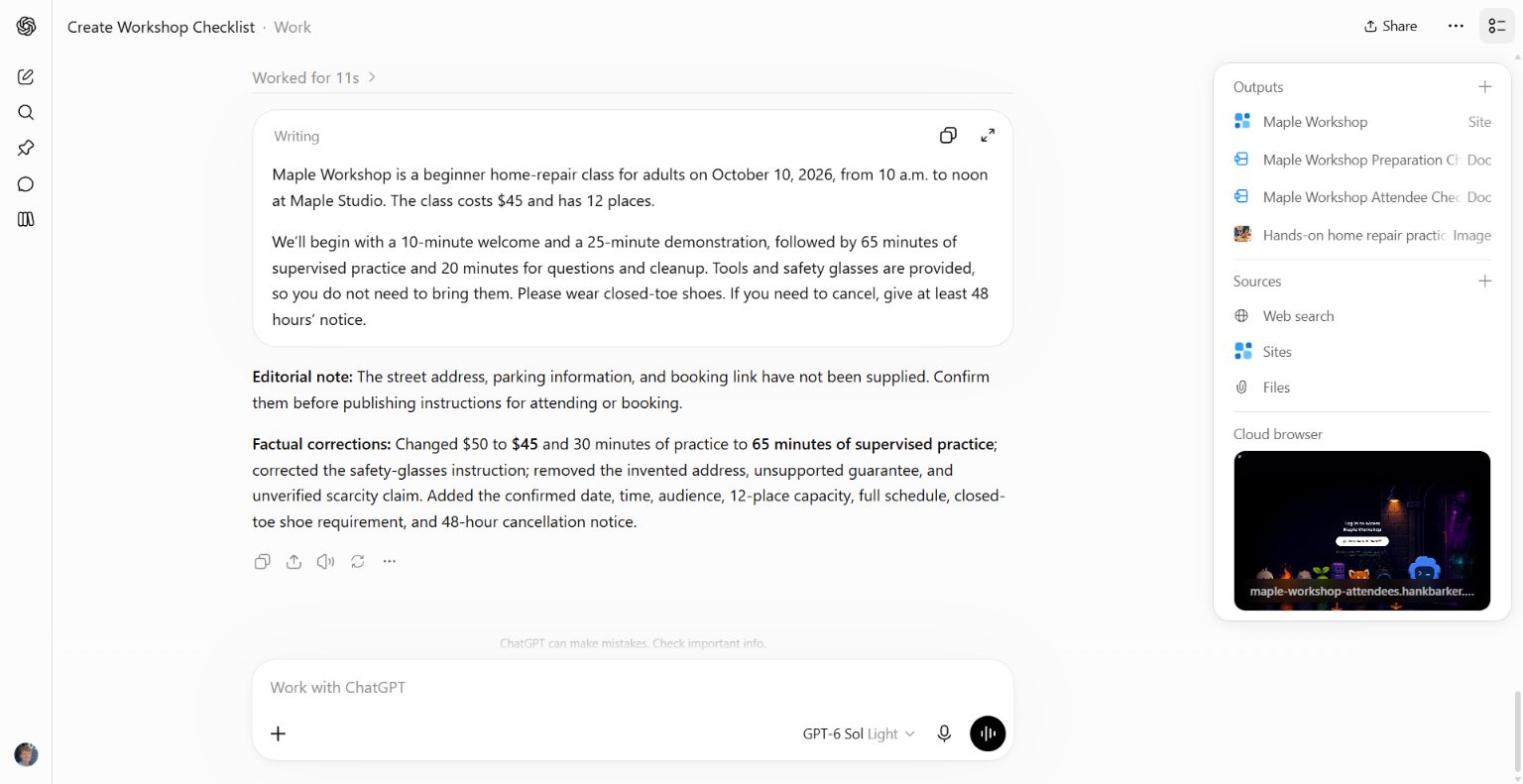
The actual revision uses $45 and 65 minutes, restores the supplied equipment and shoe requirement, and removes the invented address and unsupported urgency.
The revised text also includes the confirmed date, time, capacity and cancellation notice. The unresolved address, parking and booking link remain outside the public copy. That separation prevents a placeholder or internal question from being mistaken for an attendee instruction.
5. Check the revision against the original goal
Read the revised version yourself. Check the numbers against the source, then ask whether the reader can do what the piece is supposed to help them do. In this case, the copy is more accurate, but the missing address and booking link still need a human decision before it becomes a complete invitation.
Do not let the correction list replace inspection. A model can say it fixed a detail while leaving the old wording somewhere else. Compare the actual output with the brief. If you are reviewing a presentation, open the slides. If it is a document, inspect the exported pages as well as the text.
For a second pass, narrow the request:
Check only whether the revised version satisfies the three agreed fixes. Quote any remaining contradiction. Do not introduce new stylistic changes unless they prevent the intended reader from understanding the message.
This keeps a useful review from turning into an endless cycle of rewrites.
Adapt the criteria to the work
For a presentation, give it the audience and decision you want the slides to support. Ask where the argument is unclear and which slide needs evidence. For a proposal, provide the client's stated requirements and ask which are missing or unsupported. For training, provide the learner's task and ask whether the example and practice activity teach that task.
If you want visual feedback, provide the actual design or rendered pages. A text-only description cannot establish whether a chart label is cut off or whether the slide is crowded. Ask it to distinguish what it can see from what it is inferring.
What was tested
The flawed announcement was submitted to ChatGPT Work, reviewed against the existing fictional workshop facts, and revised in a second request. The screenshots show that real exchange. The extra prompts in this guide are suggested adaptations, not claims that every type of document was tested.
Keep a copy of the guide
Download the PDF to keep the steps and prompts handy while you work.
Put this to work with your team
I’m Hank Barker, founder of PriorAIty. I help Michigan teams build useful AI habits through hands-on training and adoption consulting, with in-person and virtual options.
Keep going
- Use ChatGPT, Claude or Copilot inside Excel
Open a copy of a workbook, ask the AI to explain its structure, then give it one specific change. Once you can check that change, move on to a summary, PivotTable or chart. This guide covers the three setup routes and gives you a small workbook with answers you can verify yourself.
- Make your AI designs and writing match your brand
Give an AI your real logo, a few designs you like and examples of your writing. Have it identify the choices already present, ask about the choices that are missing, and turn your answers into a brand sheet plus instructions you can reuse. The example here is a fictional workshop business. The screenshots show the actual source review, interview and resulting files.
- Get started with ChatGPT Work
Give Work a concrete assignment, inspect the file it produces, and refine it in the same conversation. This walkthrough starts with a small set of fictional workshop facts and ends with an editable Word checklist. It also shows a real first-draft mistake and the correction that fixed it.
Weekly AI guide
The Weekly AI Guide
One genuinely useful AI use case a week, whatever news matters, and what I've got coming up: free sessions, new guides, upcoming trainings.