
Practical AI · 6 min read
Create a searchable library of your documents
By Hank BarkerPublished
Put the information for one topic in a notebook, then ask questions across it. This is useful when the answer lives across several documents: class details, preparation instructions, customer feedback and policy notes, for example.
Put the information for one topic in a notebook, then ask questions across it. This is useful when the answer lives across several documents: class details, preparation instructions, customer feedback and policy notes, for example.
The current Google product is Gemini Notebook. You may know it as NotebookLM; older links can redirect. We tested this walkthrough in the live Gemini Notebook web interface on September 28, 2026.
1. Start with a narrow topic
Open Gemini Notebook and create a notebook. Name it for the job it should help with. “Maple Workshop class operations” is more useful than “Everything.” Add a few reliable sources first so you can check whether the answers are grounded correctly.
Our demonstration contains two fictional sources: class information and six customer comments. Each has a descriptive title and a date. The comments have IDs F01 through F06 so a recommendation can be traced to a specific response.
2. Add and label the sources
Choose Add sources. In our run, Copied text opened a field where we pasted each source and selected Insert. You can also use supported files, Drive documents and links. Wait for each source to finish processing before asking a question.
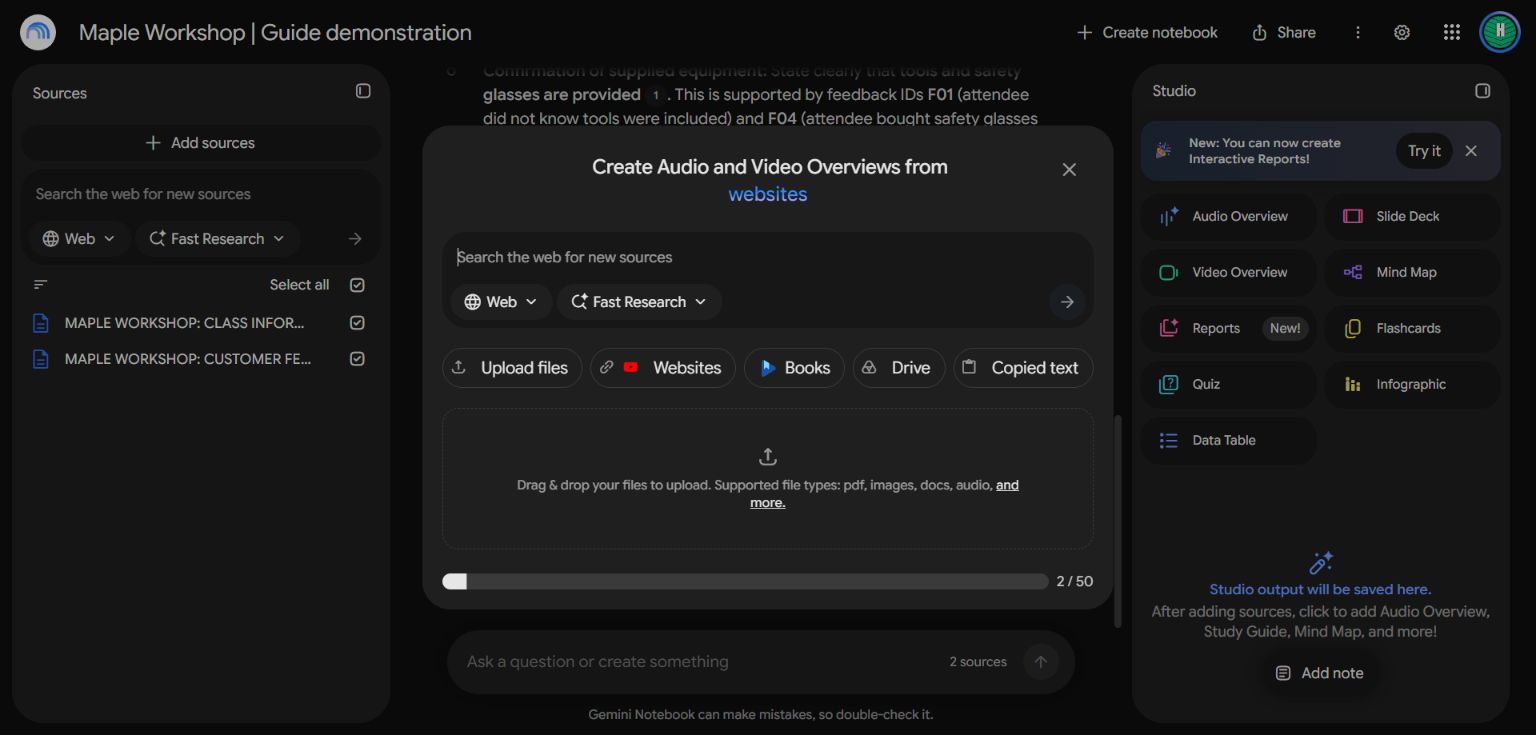
The live dialog offers uploads, websites, Drive and copied text. Choose the route that matches your source.
If a document is a scan, confirm that its text is readable. If you add a web page, check what was imported; linked pages and embedded media are not automatically the same source. Check the imported content before assuming a video source includes every visual detail shown in the video.
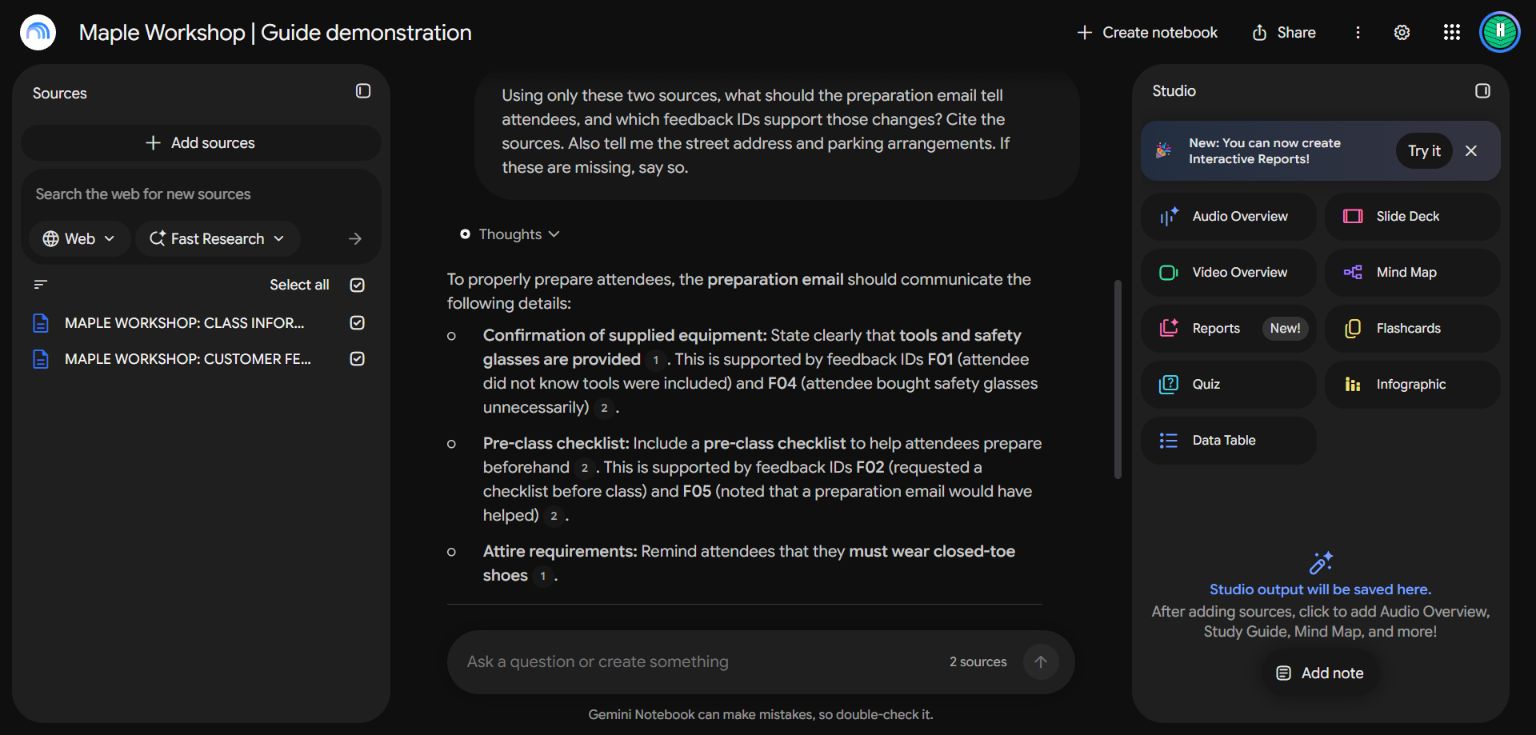
The source list and answer are from the live demonstration. All workshop data is fictional.
3. Ask a question that crosses documents
Using only these sources, what should the preparation email tell attendees, and which feedback IDs support those changes? Cite the sources. Also tell me the street address and parking arrangements. If these are missing, say so.
The answer connected the supplied-equipment facts to F01 and F04, and the checklist request to F02 and F05. It also stated that the street address and parking information were missing. That is the behavior you want: useful synthesis with visible boundaries.
4. Open the citations
Click a citation beside a claim. Read the underlying source passage and check that it supports what the answer says. A citation beside a sentence is not enough by itself. Look for the right date, topic and scope.
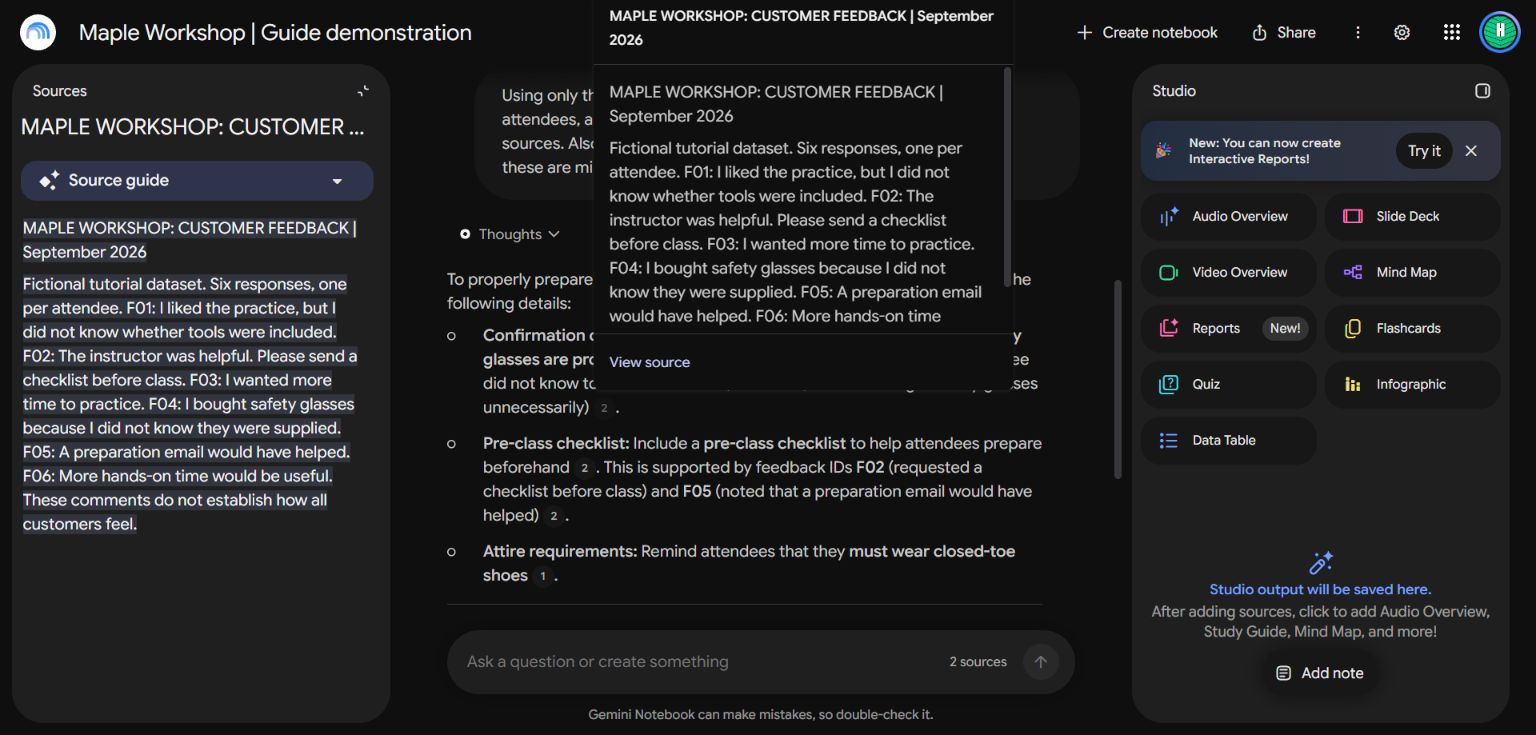
Ask one question with a known answer and one with a deliberately missing answer before relying on the notebook. If it combines old and new policies, deselect the outdated source or label versions more clearly.
5. Keep the library current
Maintain a short source register: title, owner, date, topic and whether it is current. Google's current documentation says supported Drive sources can auto-sync. Uploaded copies and pasted text need their own maintenance. Check the source's status after an update rather than assuming every source refreshes the same way.
Identify conflicting versions of the workshop policy. Show the source titles and dates. Use the latest approved version only when the documents clearly establish that it supersedes the older one. Otherwise ask me which version governs.
6. Test what happens when versions disagree
For the expanded demonstration, we added a third source: an older schedule draft with 30 minutes of practice. Its text explicitly says the current class information supersedes it. That makes the relationship between versions clear rather than asking the AI to guess from two dates.
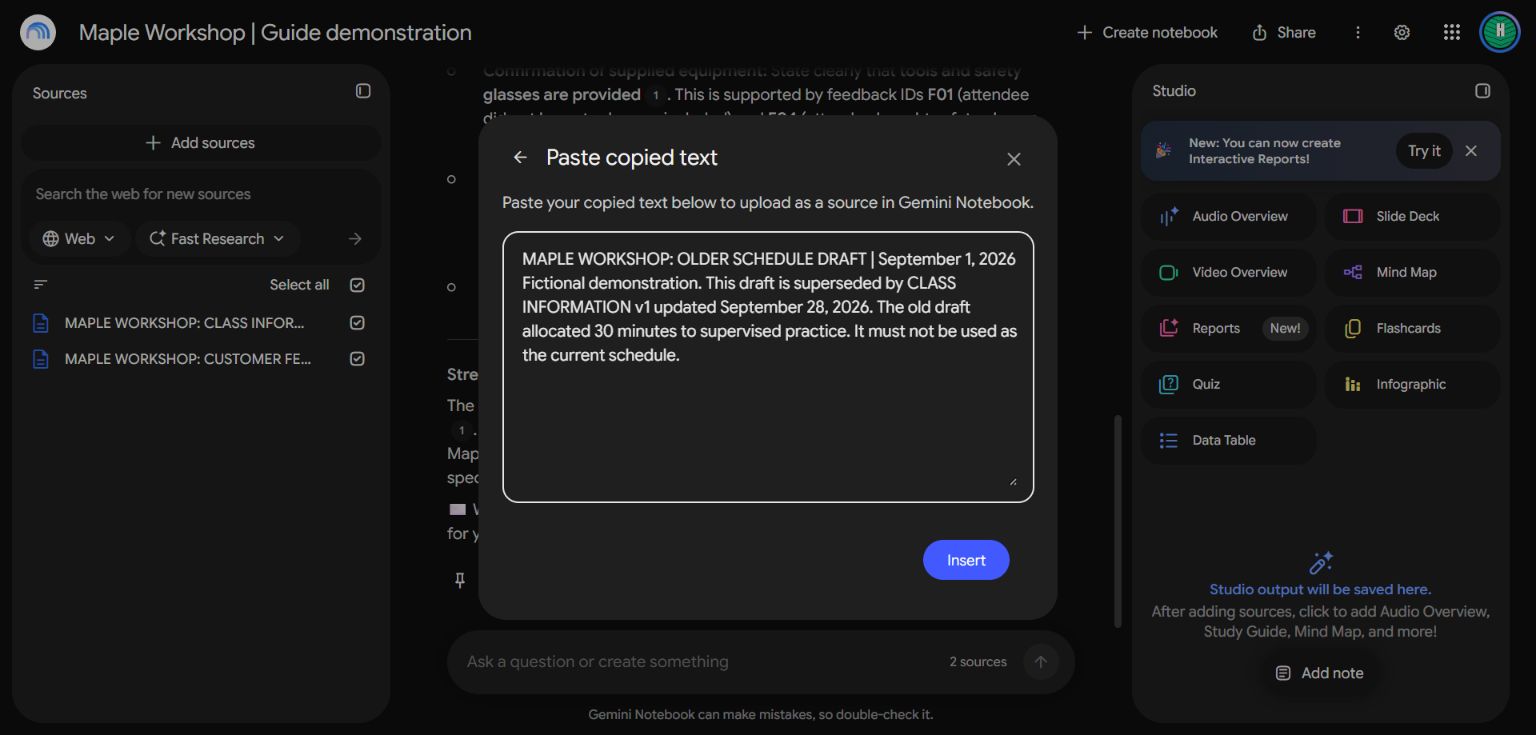
A descriptive title and an explicit version note help both the AI and the reader interpret the document.
After the import finished, all three sources were selected. We asked: “Which supervised practice duration should I use in the current welcome document: 30 or 65 minutes? Compare the source versions, cite both, and explain which source explicitly supersedes the other. Do not average the numbers.”
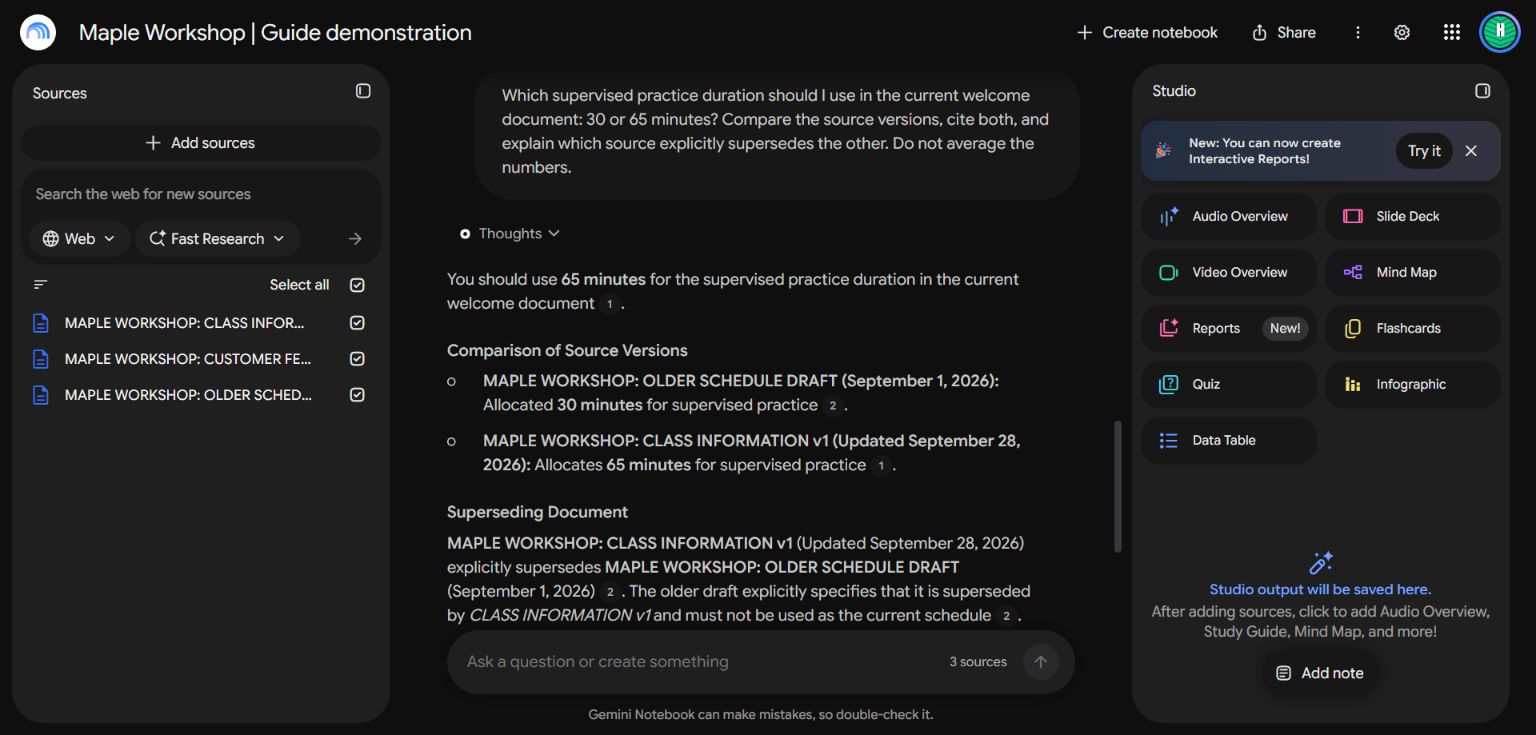
The answer selected 65 minutes, described the older 30-minute draft and cited the statement that it was superseded. We opened that citation to check the wording. This is a stronger test than asking a question that appears in only one source.
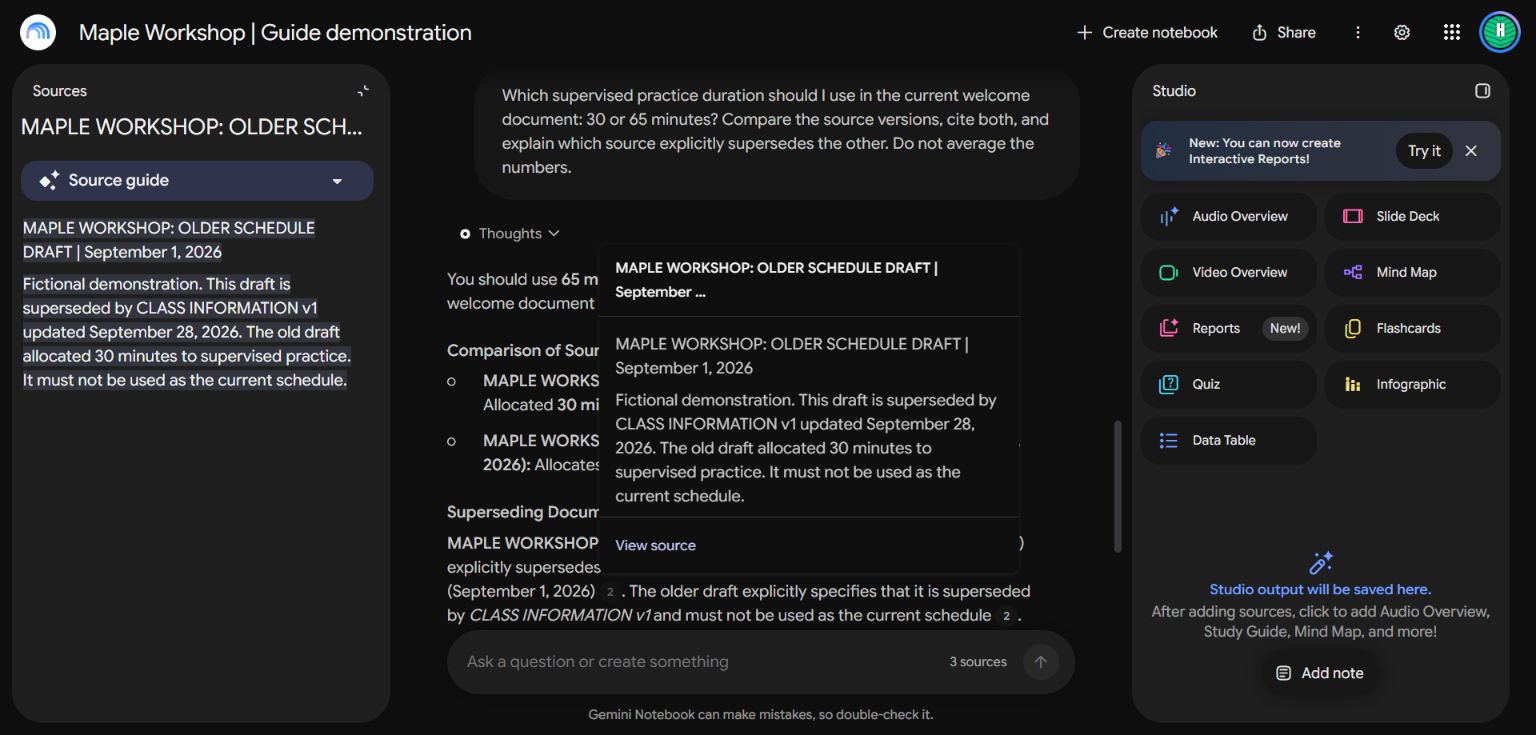
If the documents do not establish which version is approved, ask the notebook to flag the conflict for a person. A newer date alone may mean a draft, not an approved replacement. For routine questions, deselect old material when it is unnecessary; retain it separately when historical comparisons matter.
7. Keep the organization manageable
Use a notebook for one topic or project with a coherent set of questions. For a business, separate current operations, product research and training references when their sources serve different purposes. A notebook called “Everything” makes it harder to recognize when the wrong material influenced an answer.
Ask the AI to propose source groups and naming conventions, but review the actual source list. Maintain a small register with the title, owner, date, current status and update method. Pasted text is a snapshot; a source connected to a live document may have a different update behavior. Check that the content you expect is present after any change.
Useful ongoing questions include “Which sources disagree?”, “What information is missing for this decision?”, and “Which documents support this recommendation?” A searchable library should help you locate and verify knowledge, not hide the underlying documents behind a confident answer.
Using Projects instead
A Claude or ChatGPT project can keep related files and instructions together for ongoing work. That can be convenient when you want to produce documents as well as ask questions. Test its source references separately; do not assume its citation behavior is identical to Gemini Notebook.
Use the same discipline in either place: one clear topic, reliable sources, known-answer checks and regular updates. Start small enough that you can recognize a wrong answer.
Source: Google's source types, import and sync guidance. The import, missing-information question, opened citations and version-conflict example were observed in the live interface on September 28, 2026. All workshop data is fictional. These checks demonstrate this notebook's behavior in the example, not a guarantee that every answer will be correct.
Keep a copy of the guide
Download the PDF to keep the steps and prompts handy while you work.
Put this to work with your team
I’m Hank Barker, founder of PriorAIty. I help Michigan teams build useful AI habits through hands-on training and adoption consulting, with in-person and virtual options.
Keep going
- Use ChatGPT, Claude or Copilot inside Excel
Open a copy of a workbook, ask the AI to explain its structure, then give it one specific change. Once you can check that change, move on to a summary, PivotTable or chart. This guide covers the three setup routes and gives you a small workbook with answers you can verify yourself.
- Make your AI designs and writing match your brand
Give an AI your real logo, a few designs you like and examples of your writing. Have it identify the choices already present, ask about the choices that are missing, and turn your answers into a brand sheet plus instructions you can reuse. The example here is a fictional workshop business. The screenshots show the actual source review, interview and resulting files.
- Get started with ChatGPT Work
Give Work a concrete assignment, inspect the file it produces, and refine it in the same conversation. This walkthrough starts with a small set of fictional workshop facts and ends with an editable Word checklist. It also shows a real first-draft mistake and the correction that fixed it.
Weekly AI guide
The Weekly AI Guide
One genuinely useful AI use case a week, whatever news matters, and what I've got coming up: free sessions, new guides, upcoming trainings.