
Tools · New
Where AI Fits: find the work where AI saves your team the most time
By Hank BarkerPublished Updated
Where AI Fits is a web tool for owners, executive directors, and team leads. It asks the questions that give AI enough to work with, maps your team's week, and scores every task for time saved, ease of starting, and risk. Then it writes a step-by-step guide for any recommended task in the AI tool you pick, plus a 90-day plan, a Word report for leadership, and an Excel tracker.
$149 per organization, or $499 for a consultant license. One-time prices.
The example is read-only and made up. It opens in a new tab and needs no sign-in.
At a glance
- What it does
- Finds the tasks where AI saves your team the most time, and tells you how to start each one.
- Who it's for
- Owners, executive directors, operations leads, and team managers at small businesses, nonprofits, and associations.
- Works with
- ChatGPT, Claude, Microsoft Copilot, and Gemini, using the plans your team already has.
- What you get
- A ranked task list and map, a step-by-step guide you can open for any recommended task, a 90-day plan, an email and a Word report for leadership, and an Excel tracker for 30 days.
- How the numbers are set
- The AI is told to keep every time estimate inside cautious ranges informed by published studies of AI at work. The report shows the math and links the studies.
- Where your work is saved
- Only in your own browser.
- Price
- $149 per organization, or $499 for a consultant license. These are one-time prices. Both tools together cost $179.
- Status
- New in October 2026. A read-only example is open now.
- Built by
- Hank Barker, founder of PriorAIty.
Two kinds of numbers about AI
Leaders hear two very different numbers about AI. Vendor demos often suggest it will hand teams back a big part of their week. Studies of real workplaces find that people who use AI save about 2 to 6 percent of their working hours, and a real share of what AI saves goes into checking and fixing its work.
Where AI Fits is built around the second kind of number. It keeps its estimates cautious, shows the math, and links the studies, so leadership can see where the numbers came from. Advice from AI is also only as specific as what it's told, so the tool asks the questions people skip, and shows a meter for how much detail the AI has to work with.
How Where AI Fits works
Step 1
Tell it about the organization and team
What the team does, which AI tools and plans it has, what sensitive information it handles, and what would make the next 90 days a success. Not sure of an hourly cost or the working weeks in a year? Work them out in the tool. Or press Talk it through, describe the organization in your own words, and the AI fills in the answers for you to check.
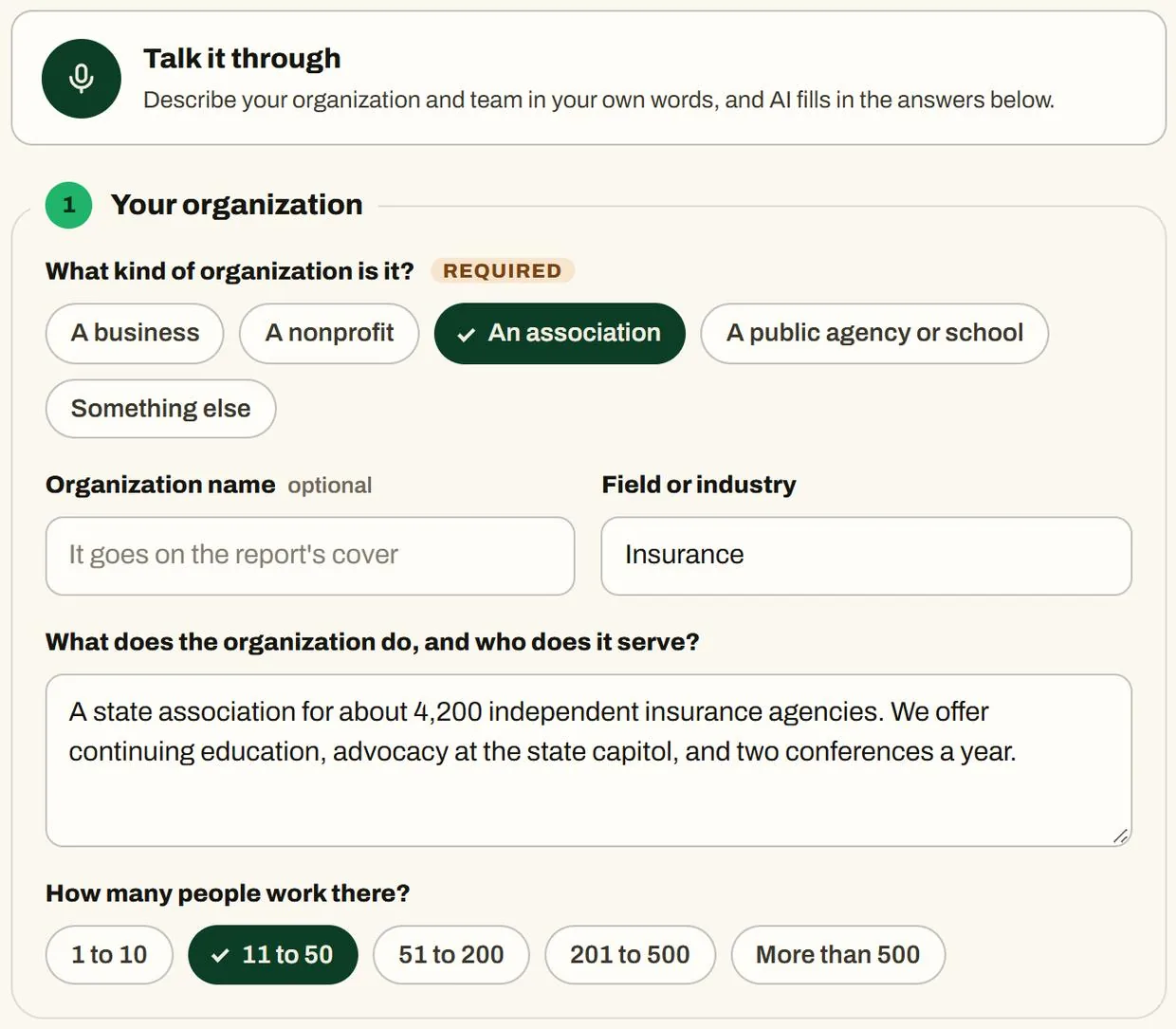
Step 1 for a made-up association. Screenshot from the tool's made-up example. Step 2
Walk through a typical week
Eight questions about what comes in, what the team produces, and the thinking work. You answer at least four, in a sentence or two each, and a meter shows how much detail the AI has.
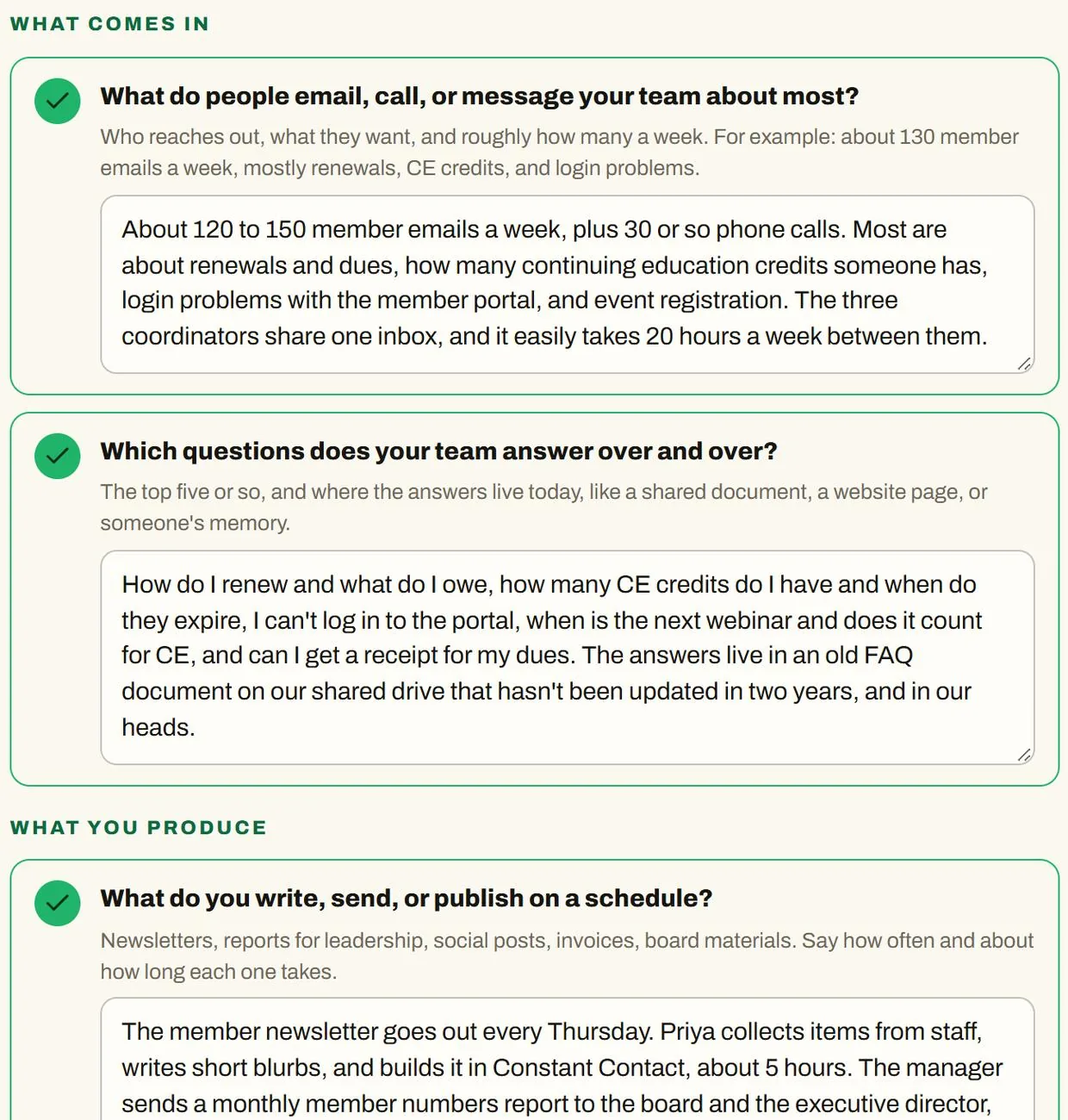
The week questions, with made-up answers. Screenshot from the tool's made-up example. Step 3
Add the details that make advice specific
Each task gets how it's done today, the tools it uses, what it starts from and produces, the rules and limits, and what slows it down. Dots show how complete each task is. The more detail a task has, the more specific its guide.
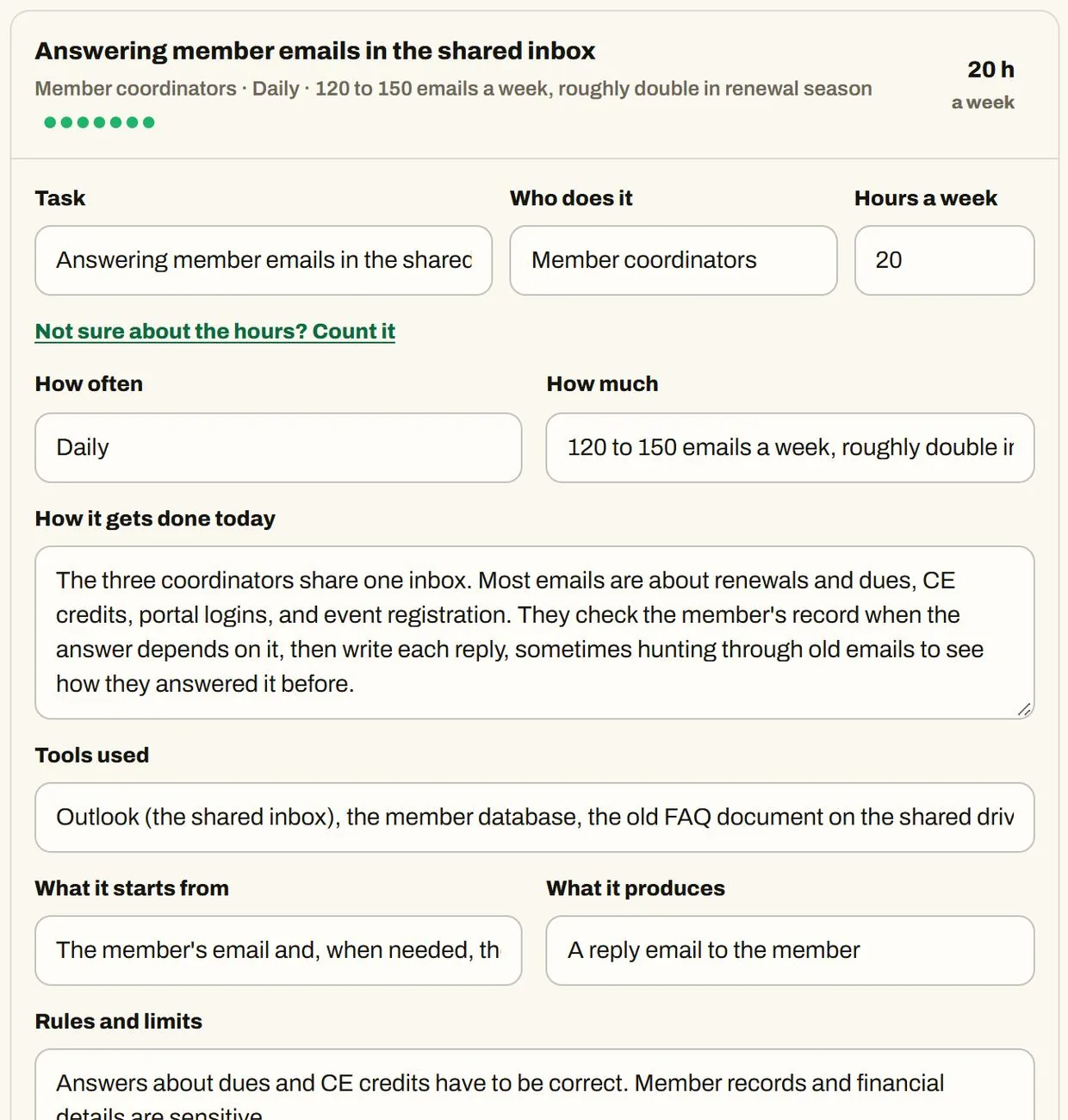
One task, with its details filled in. Screenshot from the tool's made-up example. Step 4
See where AI fits
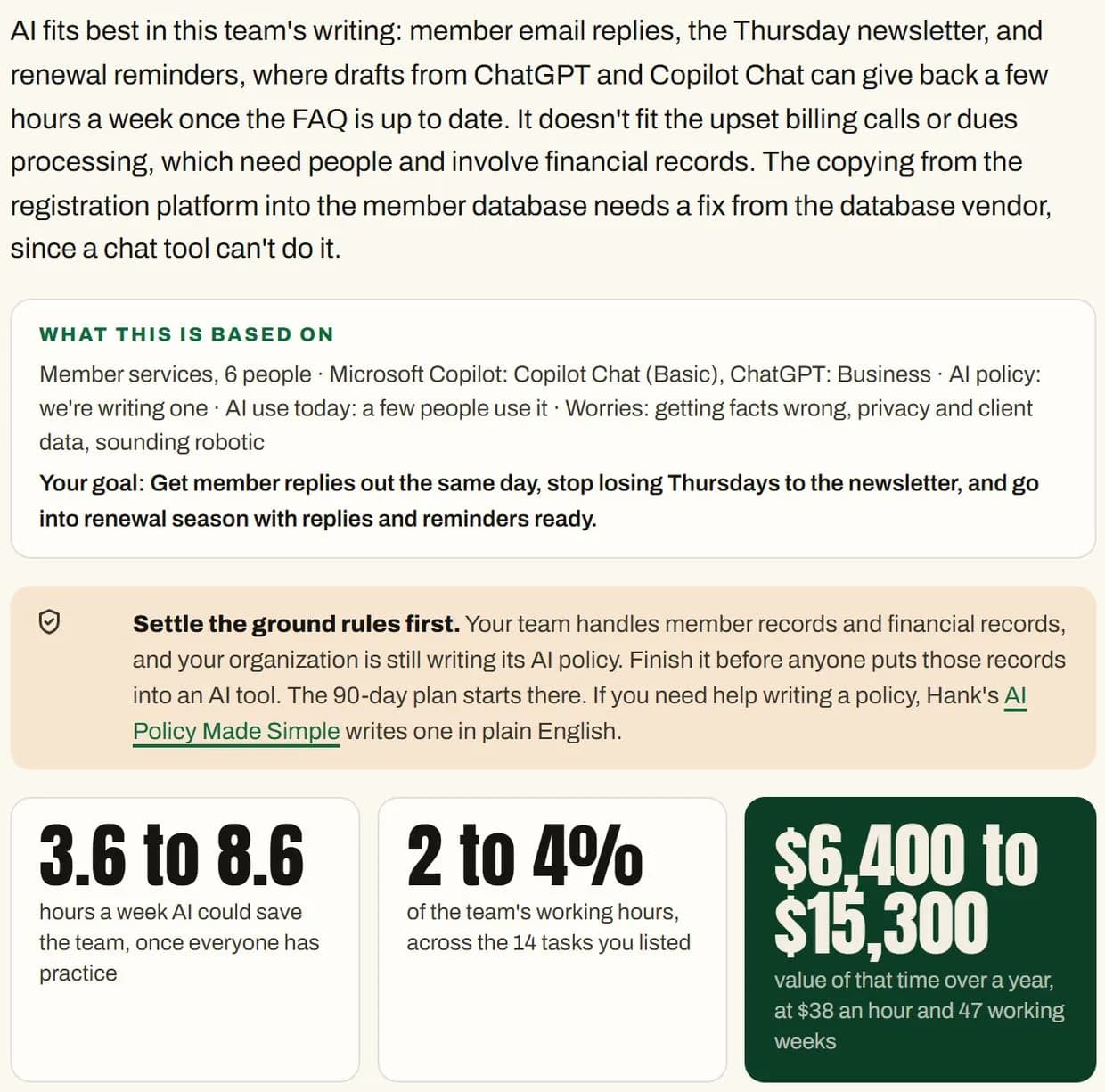
Every task is scored for time saved, ease of starting, and risk. You get three big numbers, a map of where to start, a ranked list, and the tasks to leave alone for now. When the team handles sensitive records and has no AI policy yet, the ground rules come first.
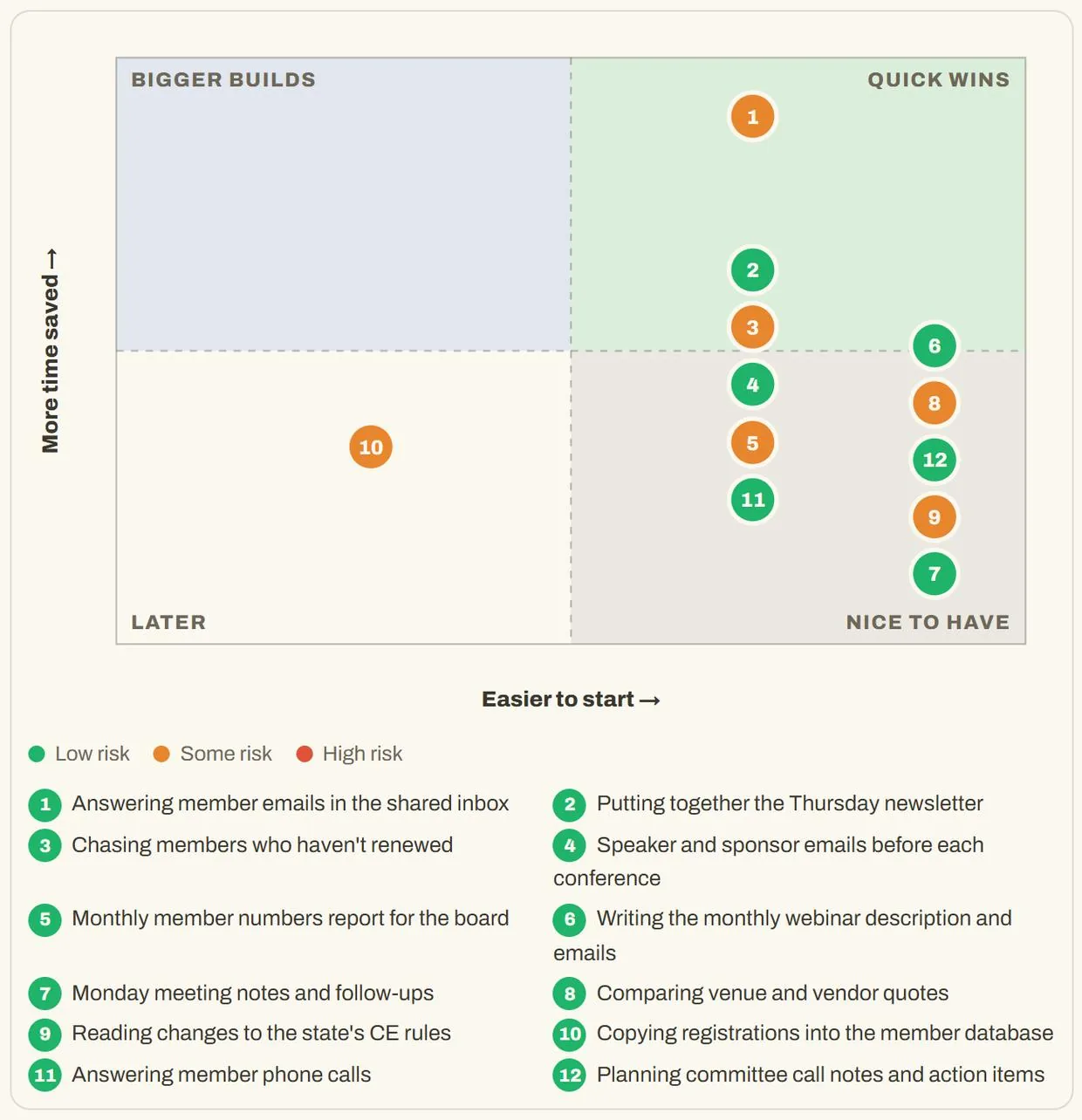
The map of where to start, for the made-up team. Screenshot from the tool's made-up example. Step 5
Open a guide for any recommended task
Click "Show me how, step by step" and get a guide for one of your tools: set it up once, the instructions to paste, the files worth adding, the prompts to copy word for word, what to do each time, and what to check before it goes out.
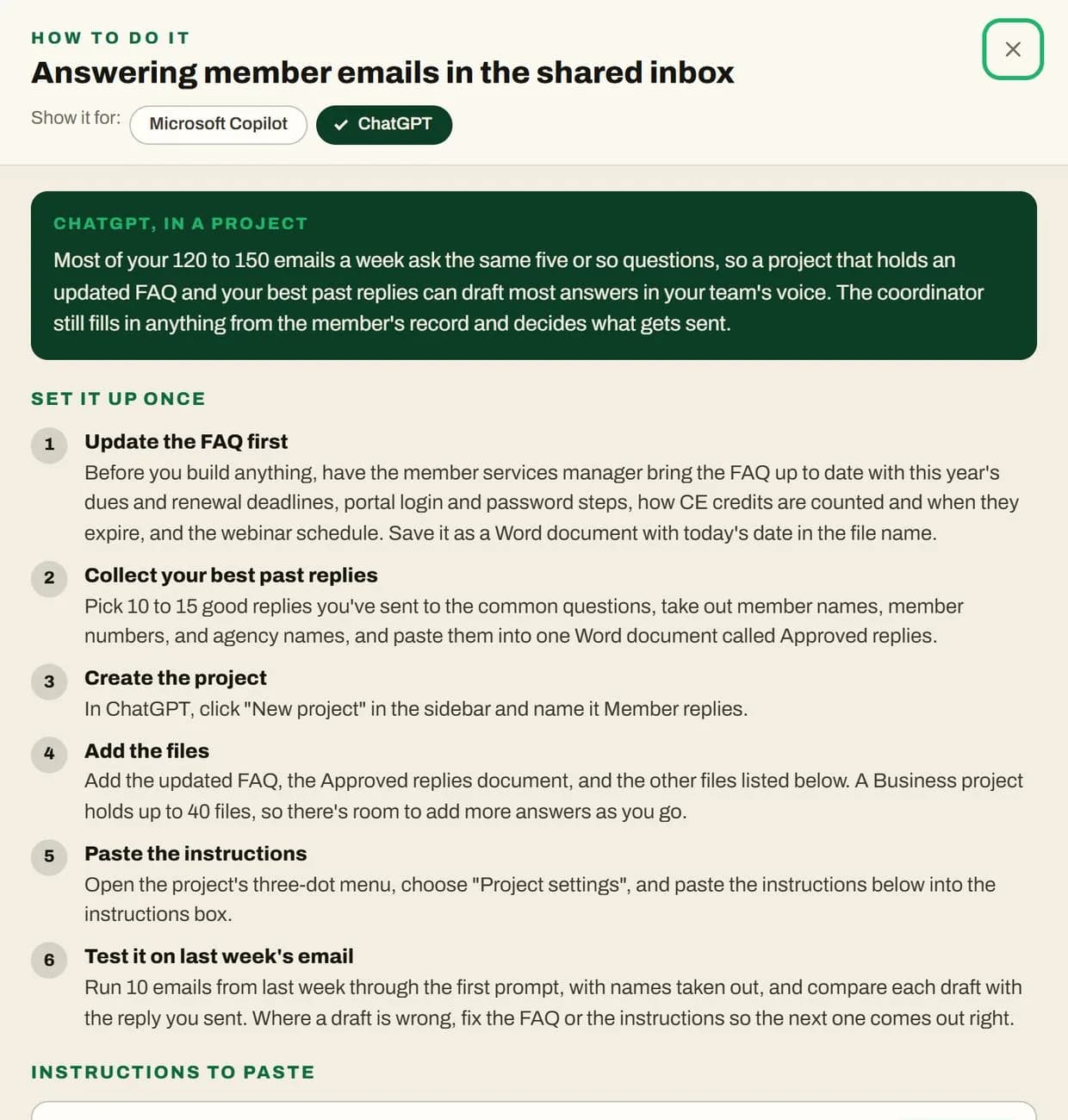
A guide for one task in one tool. Screenshot from the tool's made-up example. Step 6
Get the 90-day plan
Ground rules and quick wins in the first 30 days, saved skills in the next 30, and a look at what worked in the last 30, with training and simple ways to measure. An Excel tracker has the team log real minutes for 30 days and compares them with the estimate.
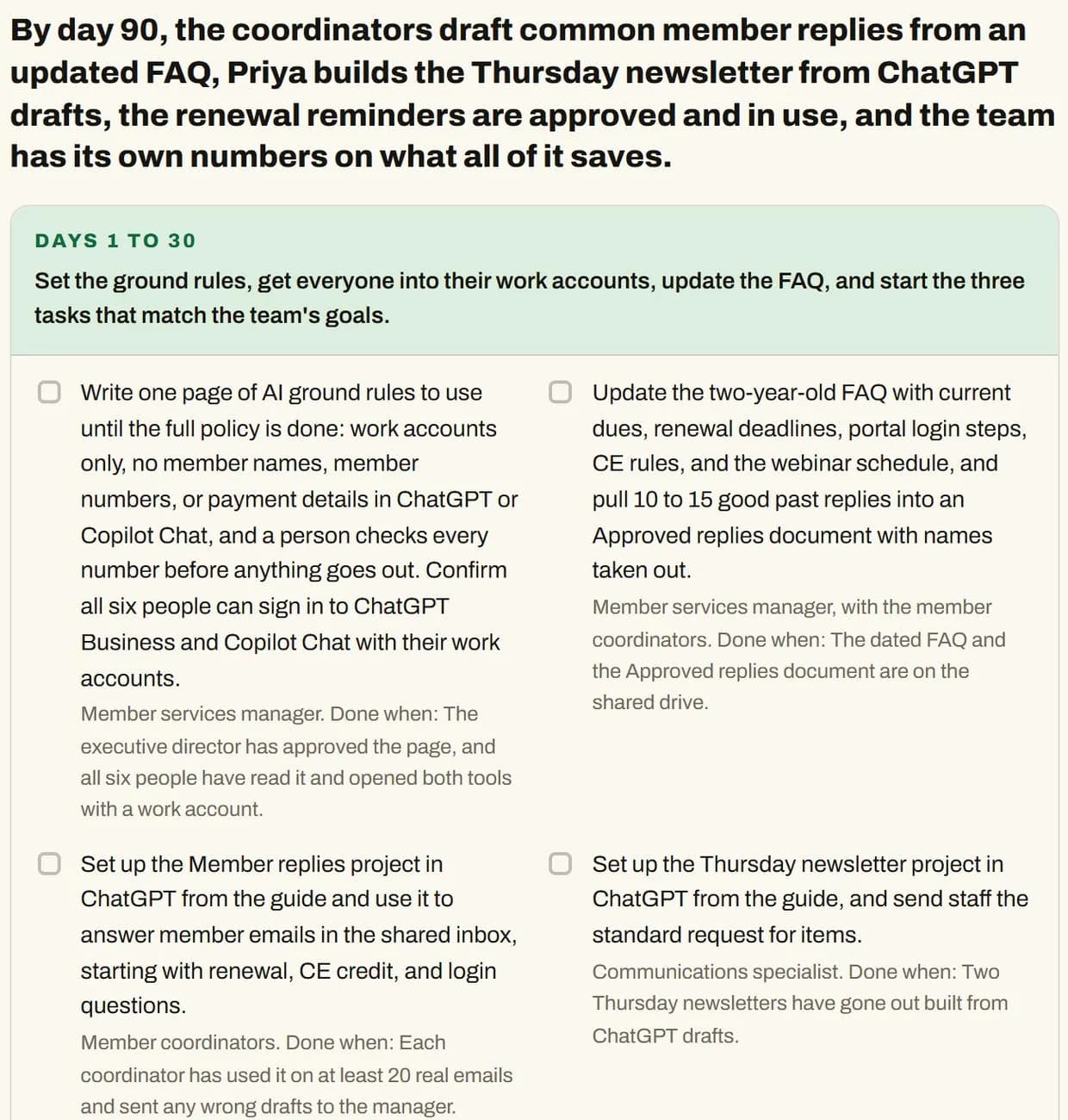
The 90-day plan for the made-up team. Screenshot from the tool's made-up example. Step 7
Share it with leadership
Copy the email that makes the case, and download the Word report with the numbers, the plan, the guides, and the studies behind the estimates.
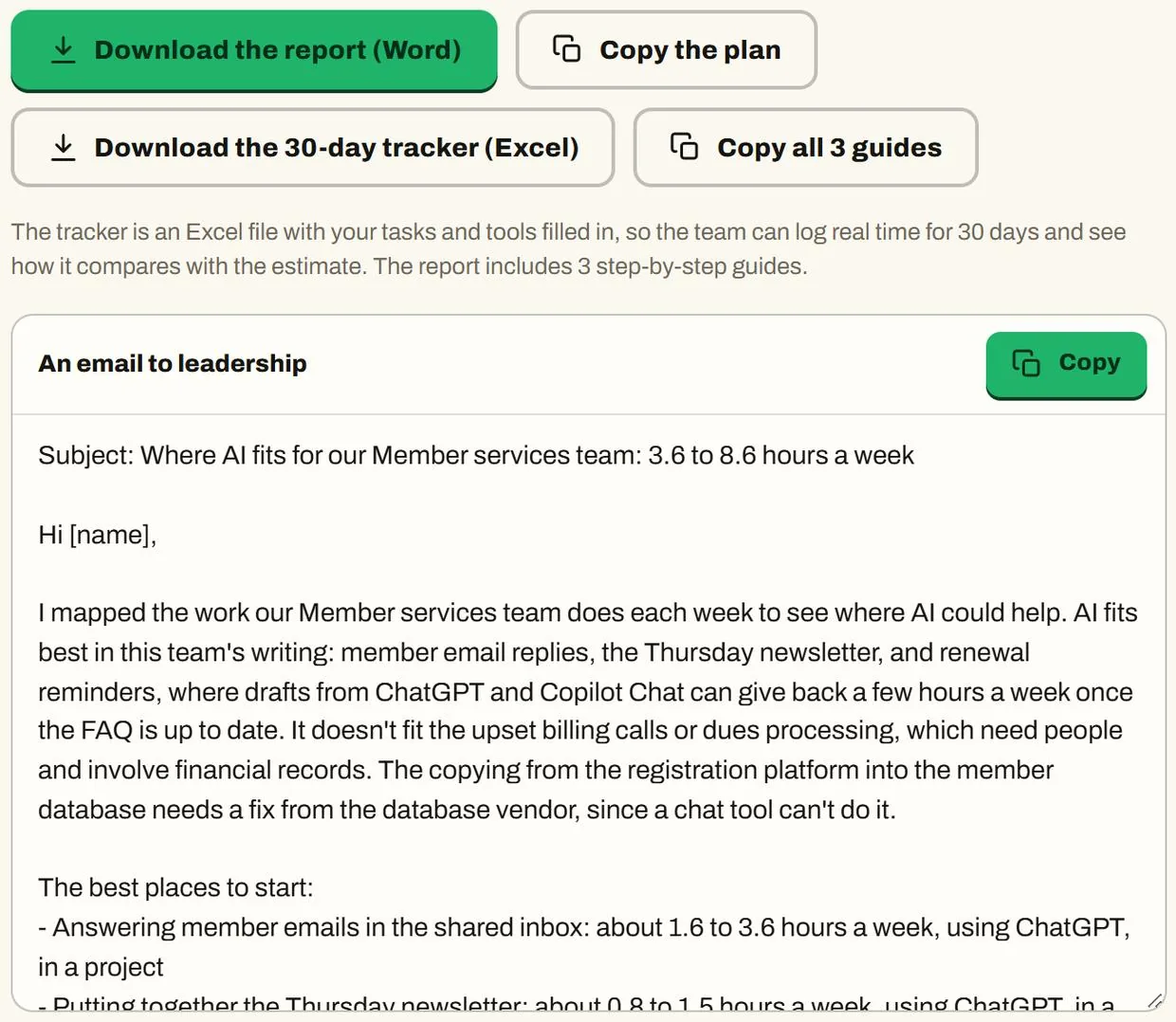
The email and report for leadership. Screenshot from the tool's made-up example.
What the built-in example shows
The example is a made-up six-person member services team at an association. The team, the answers, and the numbers are invented. The AI's answers came from Claude, running the tool's own prompts.
- →The team listed 14 tasks and 57 hours of weekly work.
- →In one run of this made-up example, the tool estimated 3.6 to 8.6 hours a week saved once the team has practice, about 2 to 4 percent of their time, worth roughly $6,400 to $15,300 a year at $38 an hour and 47 working weeks.
- →It ranked member emails in the shared inbox, the Thursday newsletter, and chasing members who haven't renewed as the places to start.
- →It said to keep upset billing calls and dues processing with people for now, and that copying registrations into the member database needs a fix from the database vendor, since a chat tool can't do it.
- →Because the team handles member and financial records and was still writing its AI policy, it put the ground rules first.
How the time-saved numbers are set
For each task, the AI picks the share of time AI could save once your team has practice, after the time it takes to check and fix its work. The AI is told to stay inside cautious ranges informed by published studies: about 10 to 35 percent for drafting documents, 5 to 15 for email, 20 to 50 for summarizing long documents, 5 to 20 for meeting notes and for answering repeat questions, 10 to 25 for research, 0 to 10 for data entry and scheduling, and 0 to 5 for work that depends on judgment or relationships. Few studies measure one kind of task at a time, so treat these as planning ranges, not study results.
Hours saved equal the hours you entered for the task times that share. The weekly total adds up every task except the ones marked not yet. The yearly value multiplies the weekly total by your working weeks and your hourly cost, which you can change. The plan has the team track real minutes for 30 days with the Excel tracker and compare them with the estimate.
Studies behind the ranges
- Noy and Zhang, Science, 2023: professionals finished writing tasks 40 percent faster with ChatGPT
- Microsoft 365 Copilot field experiment, 66 companies, 2025: time spent on email fell about 12 percent
- St. Louis Fed, 2025: people who used AI saved 5.4 percent of their work hours
- Humlum and Vestergaard, 25,000 workers in Denmark, 2025: average time saved was 2.8 percent of work hours
- Workday survey of 3,200 AI users, 2026: about 37 to 40 percent of the time AI saved went to checking and fixing its work
- METR, 2025: experienced developers were 19 percent slower with AI on their own projects, while believing they were faster
Use Where AI Fits when
- →You've been told to "figure out AI" and want a plan you can defend.
- →You manage a team and don't know which tasks to start with.
- →You need numbers for leadership that hold up when someone asks where they came from.
- →Your team handles sensitive information and needs ground rules before anyone starts.
Skip Where AI Fits when
- →You want a readiness score for the whole organization. Where AI Fits looks at one team at a time, so run it once per team.
- →You want it to set up the tools for you. It tells you exactly how, in steps you can follow and text you can paste, but it doesn't connect to your accounts.
- →You want automations that connect apps. It writes guides for chat tools, and it says when a task needs a software fix instead.
Where AI Fits pricing
These are one-time prices in US dollars.
One organization
$149
A one-time price for one organization.
Consultant license
$499
A one-time price for consultants who use Where AI Fits with their own clients.
Both tools together: $179. Skill Builder for one person and Where AI Fits for one organization, bought together.
To get access, schedule a call or email Hank.
What to know before you use Where AI Fits
- →Where AI Fits is new, so expect rough edges and tell Hank what you find.
- →These are estimates, not measurements. They depend on the hours entered, and they assume the team has had practice. That's why the plan has the team track real minutes and compare them with the estimate.
- →The guides are written by AI from what you enter, for the plans you pick, as of October 2026. Menu and button names change, so check each step against what's on your screen.
- →Plan features differ, and a few are hedged on purpose. For example, whether Copilot Chat can do a given job inside Outlook depends on your organization's setup, so the tool never promises it or rules it out. Check with your IT team before promising anything.
- →It doesn't know your systems, contracts, or policies. Which AI tools are approved for sensitive information is your organization's call, and the tool says so.
- →What you describe goes to the AI you choose, so leave out names and member or client details. Your answers are saved only in your own browser.
Questions people ask
What does Where AI Fits do?
Where AI Fits maps one team's week, scores every task for time saved, ease of starting, and risk, and tells you where to start. Then it writes a step-by-step guide for any recommended task, in the AI tool you pick from the ones your team already has, plus a 90-day plan, a Word report and email for leadership, and an Excel tracker.
How accurate are the numbers in Where AI Fits?
The numbers in Where AI Fits are estimates, held to cautious ranges informed by published studies and counted after the time it takes to check AI's work. The report shows the math and the studies, and the plan has the team track real minutes with an Excel tracker and compare them with the estimate.
Which AI tools does Where AI Fits cover?
Where AI Fits covers ChatGPT, Claude, Microsoft Copilot, and Gemini. You pick the tools and plans your team has, and each guide is written for the tool and plan you picked.
What does the Where AI Fits Word report include?
The Where AI Fits report has the summary and numbers, the team at a glance, where to start, every task with its fit and risk, guardrails by task, tasks to leave alone for now, notes on each AI tool, any step-by-step guides you've opened, the 90-day plan, and the studies behind the estimates.
Do I need to share private information with Where AI Fits?
No. With Where AI Fits, say what kinds of records your team handles, not the records themselves. Leave out names and member or client details.
Does Where AI Fits replace an AI readiness assessment?
No. Where AI Fits looks at one team's tasks, not the whole organization's readiness. If you want a full assessment, a roadmap, or hands-on training, PriorAIty offers an AI readiness assessment and an AI roadmap.
Can I use Where AI Fits for more than one team?
Yes, one team at a time. Where AI Fits keeps one team in your browser, so download the report and tracker before you start over for the next team.
Does Where AI Fits store my information?
Where AI Fits saves your answers only in your own browser and can't send anything anywhere itself. What you write goes to the AI you use, which is Claude when the tool runs inside Claude, or whichever AI you paste a prompt into.
Can a consultant use Where AI Fits with clients?
Yes. The $499 consultant license is for consultants who use Where AI Fits with their own clients.
How much does Where AI Fits cost?
Where AI Fits costs $149 per organization as a one-time price, or $499 for a consultant license to use it with your own clients. Skill Builder and Where AI Fits together cost $179. To get access, schedule a call or email Hank.
Put this to work with your team
I'm Hank Barker, founder of PriorAIty. I help Michigan teams build useful AI habits through hands-on training and adoption consulting, with in-person and virtual options. I built Where AI Fits from that work.
Keep going
- Skill Builder
Once you know which tasks to start with, turn each one into a skill your AI can follow.
- AI Readiness Assessment
A fuller look at the whole organization, with an AI maturity score and recommended quick wins.
- AI Roadmap
A 30-day plan, a 90-day plan, and a 12-month vision, with success metrics and governance.
- Before your team starts using AI
Connect AI to a business outcome, build a usable policy, train people on their work, and review a pilot before expanding.
- Which AI For Which Job
Claude, ChatGPT, Gemini, and Copilot win four different jobs. The honest breakdown, plus the pro move of using two on purpose.
- The 4 Levels Of Using AI
Most people are stuck on Level 1. The full map from typing questions into a box to running agents, and the exact move up at each level.
Weekly AI guide
The Weekly AI Guide
One genuinely useful AI use case a week, whatever news matters, and what I've got coming up: free sessions, new guides, upcoming trainings.