
Tools · New
Skill Builder: turn a task you repeat into an AI skill
By Hank BarkerPublished Updated
Skill Builder is a web tool for professionals who keep explaining the same task to AI. It asks eight questions about how you do the task, learns from your best work, and writes a skill your AI can follow whenever you ask for that task. Then it checks the skill, tests it on three inputs, and packages it for Claude, ChatGPT, Gemini, or Copilot.
$49 per person, or $299 for a team of up to 25. One-time prices.
The example is read-only and made up. It opens in a new tab and needs no sign-in.
At a glance
- What it does
- Turns a task you repeat, like follow-up emails, job posts, or replies to upset customers, into a reusable AI skill.
- Who it's for
- Professionals who do the same kind of writing every week, and managers who want a team doing it the same way.
- Works with
- Claude, ChatGPT, Gemini, and Microsoft Copilot.
- What you get
- A skill file (.zip) for Claude, ChatGPT, and Gemini, boxes to paste into a Copilot agent, plain instructions for any chat, and a Word handout for your team.
- How it runs
- In a web browser. Inside Claude, it asks Claude directly. Anywhere else, it gives you each prompt to paste into the AI you use, and you paste the answer back.
- Where your work is saved
- Only in your own browser.
- Price
- $49 per person, or $299 for a team of up to 25. These are one-time prices. Both tools together cost $179.
- Status
- New in October 2026. A read-only example is open now.
- Built by
- Hank Barker, founder of PriorAIty.
What is an AI skill?
A skill is a saved set of instructions, and sometimes examples, that an AI assistant follows when you ask for a particular task. Claude and ChatGPT call them skills. Google is replacing Gems in Gemini with skills. Microsoft Copilot calls them agents. In each one, you explain how you do a task once, and the AI uses it whenever the task comes up.
The hard part is writing instructions good enough to use. A skill written from a sentence or two of context comes out vague, and a vague skill doesn't change what the AI gives you. Skill Builder asks for the context first.
How Skill Builder works
Step 1
Pick the task, or talk it through
Start from one of 12 common tasks, like follow-up emails after meetings or replies to upset customers, or describe your own. Three boxes are required: what the skill does, what you hand it, and what you want back. Or press Talk it through and describe the task in your own words, typed or dictated with your computer's dictation shortcut. The AI fills in the task, your rules, and your first answers for you to check.
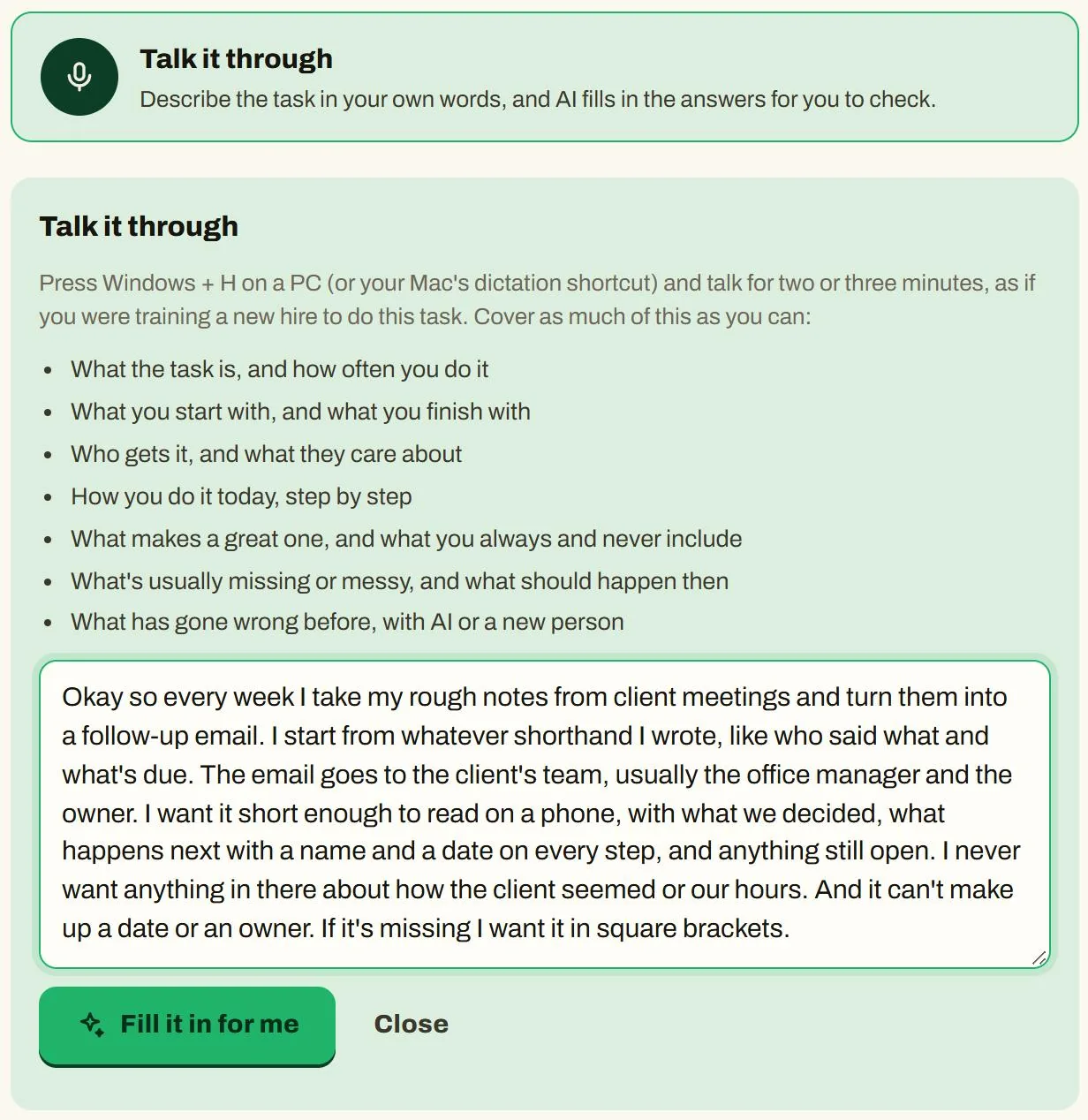
Talk it through, with a made-up description of a weekly task. Screenshot from the tool's made-up example. Step 2
Show it good work, and what bad looks like
Paste one to three finished pieces you're proud of and say what you like about them. Add something you'd never send, and what's wrong with it, so the AI knows what to avoid. No finished example yet? Answer six questions in the next step instead of four.
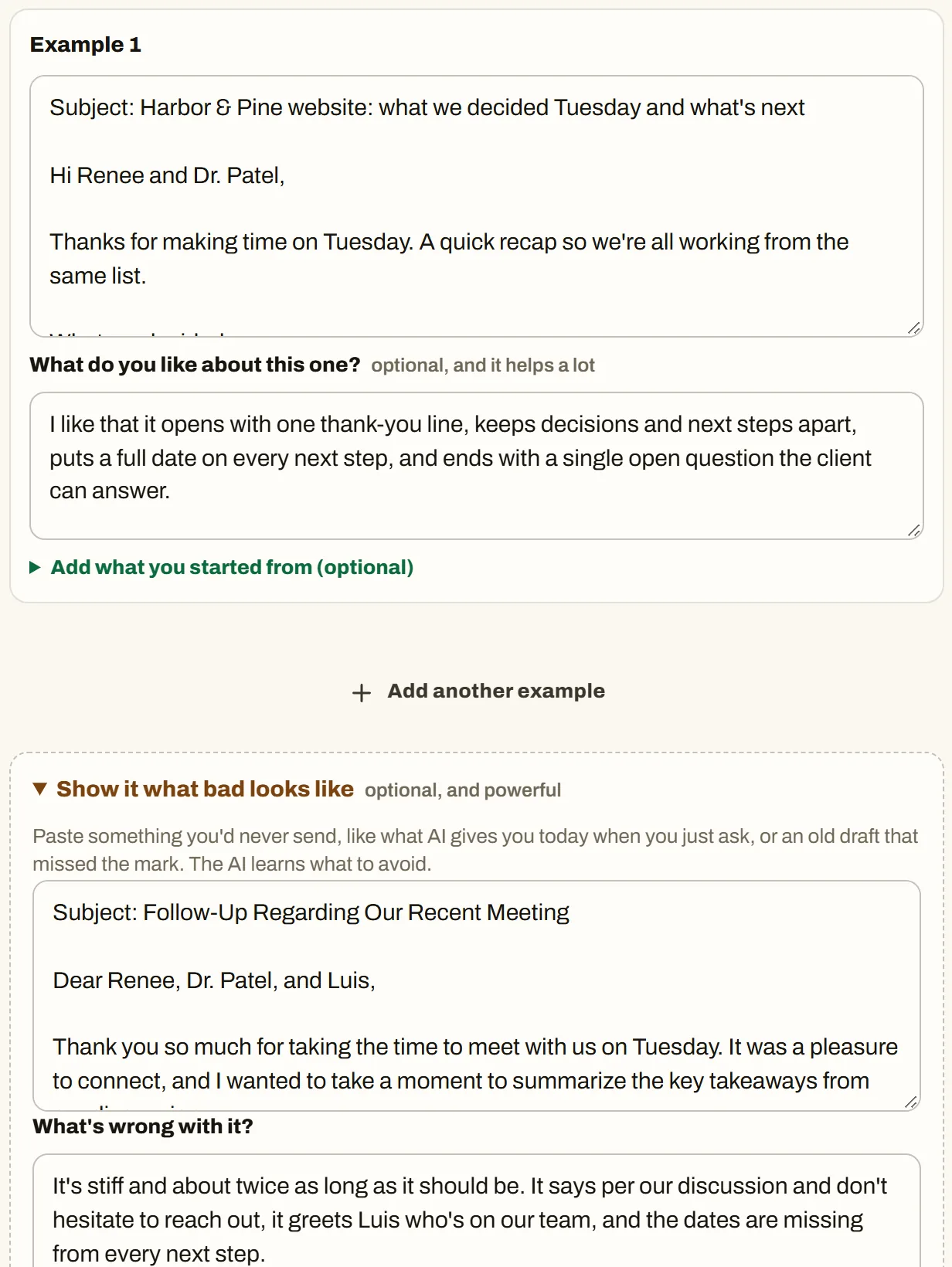
A finished example, what the person likes about it, and what bad looks like. Screenshot from the tool's made-up example. Step 3
Answer at least four of eight questions
How you do the task today, what separates a great one from a fine one, what you always and never include, what's missing in what you start with, who reads it, how it sounds, and what has gone wrong before. Four of them need a sentence or two each, or six if you have no finished example, before Skill Builder will build anything. A meter shows how much the AI has to work with.
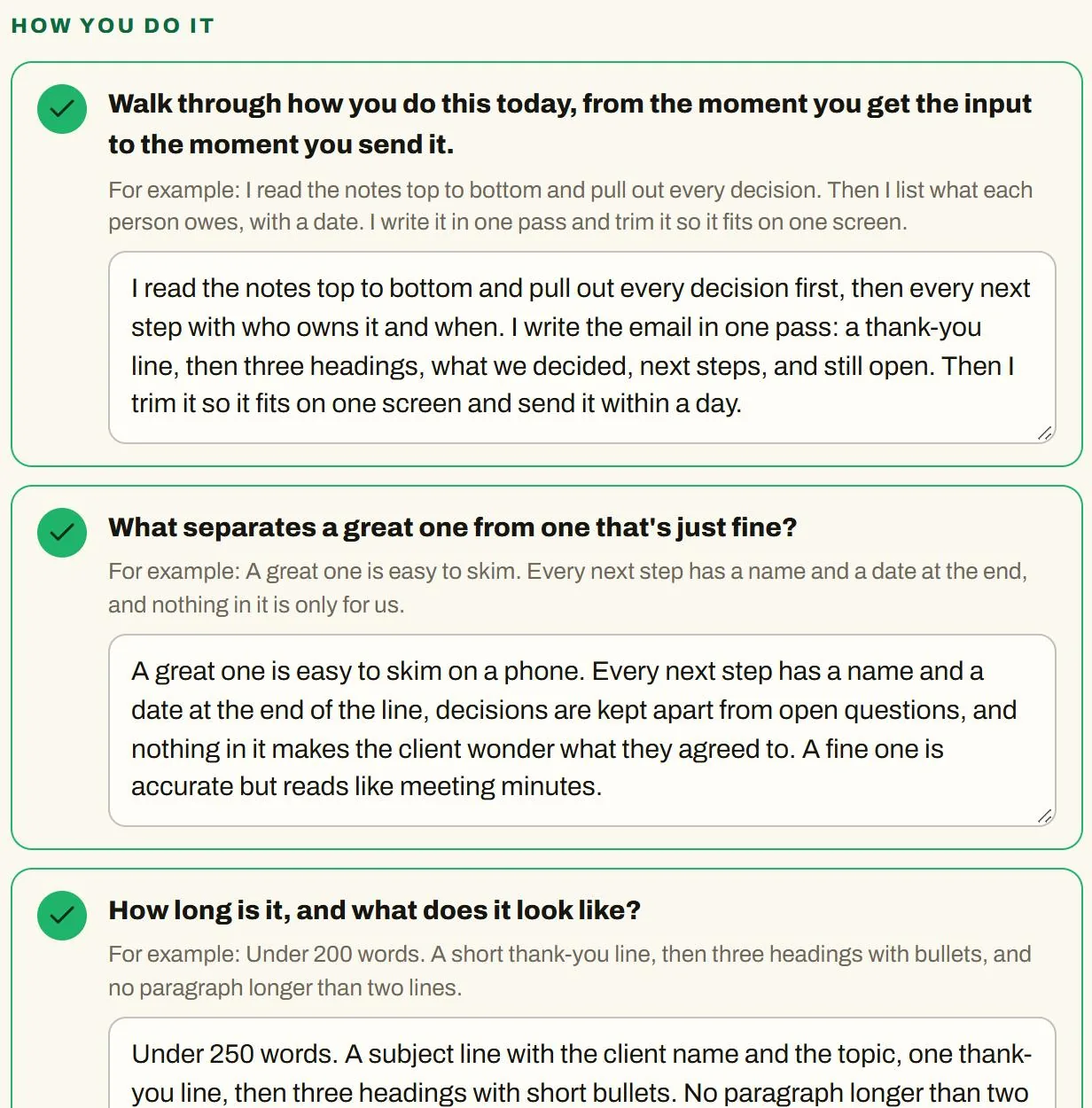
The first of the eight questions, with made-up answers. Screenshot from the tool's made-up example. Step 4
Let it ask about what you didn't say
The AI studies your example, the example of what bad looks like, and your answers together, says what it noticed, and asks follow-up questions. In the built-in example, it caught that the finished email turned a bare "Thu" into a full date, added an offer the notes never made, and filed a task under the decisions.
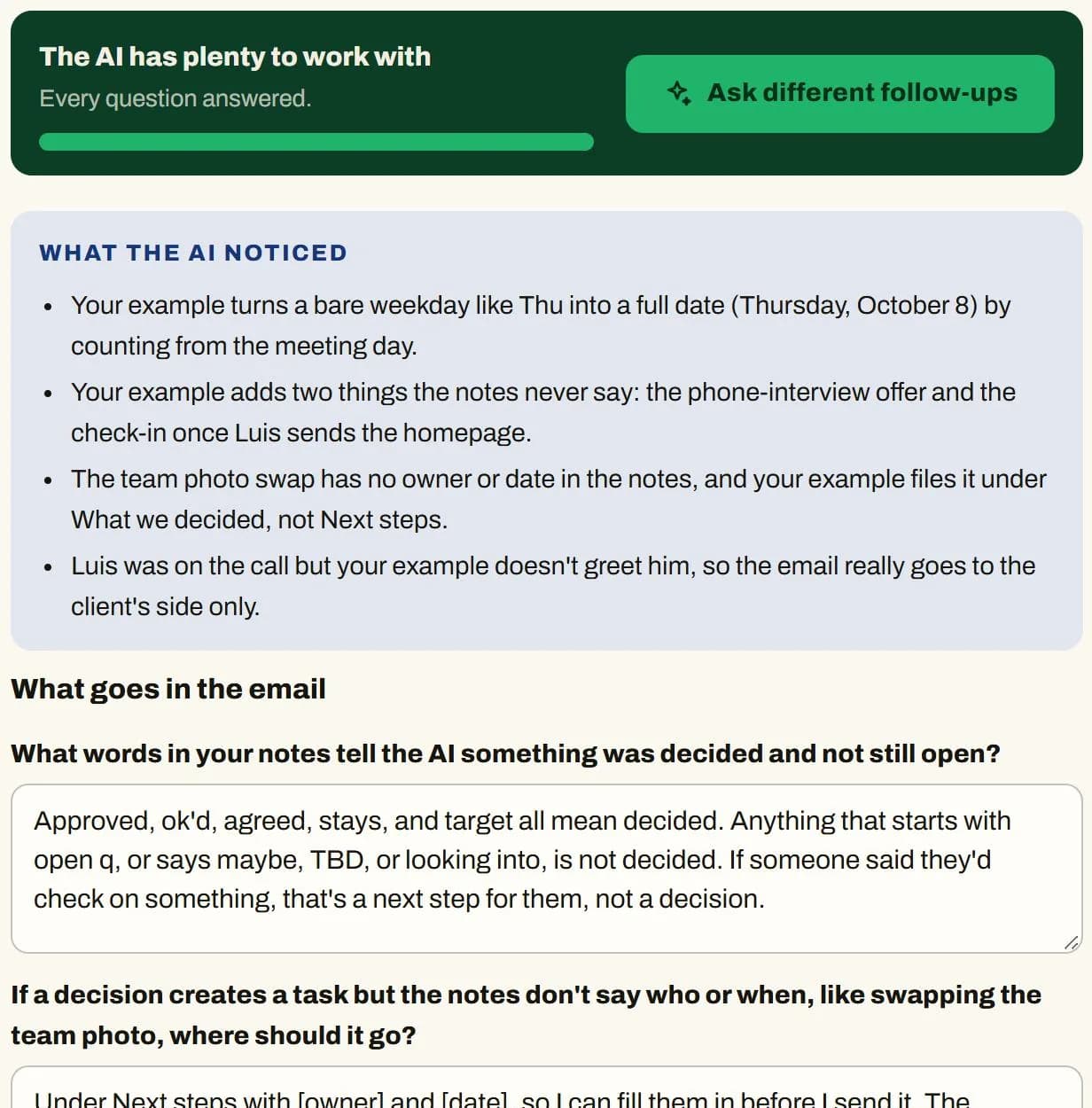
What the AI noticed, and the follow-up questions it asked. Screenshot from the tool's made-up example. Step 5
Check the skill's health
Quick checks run as you edit: whether the description says when to use the skill, vague wording, how it handles missing information, whether your own rules made it in, and Copilot's size limit. An AI review then looks for rules that clash and gaps your examples reveal. Most findings come with a fix you can apply in one click.
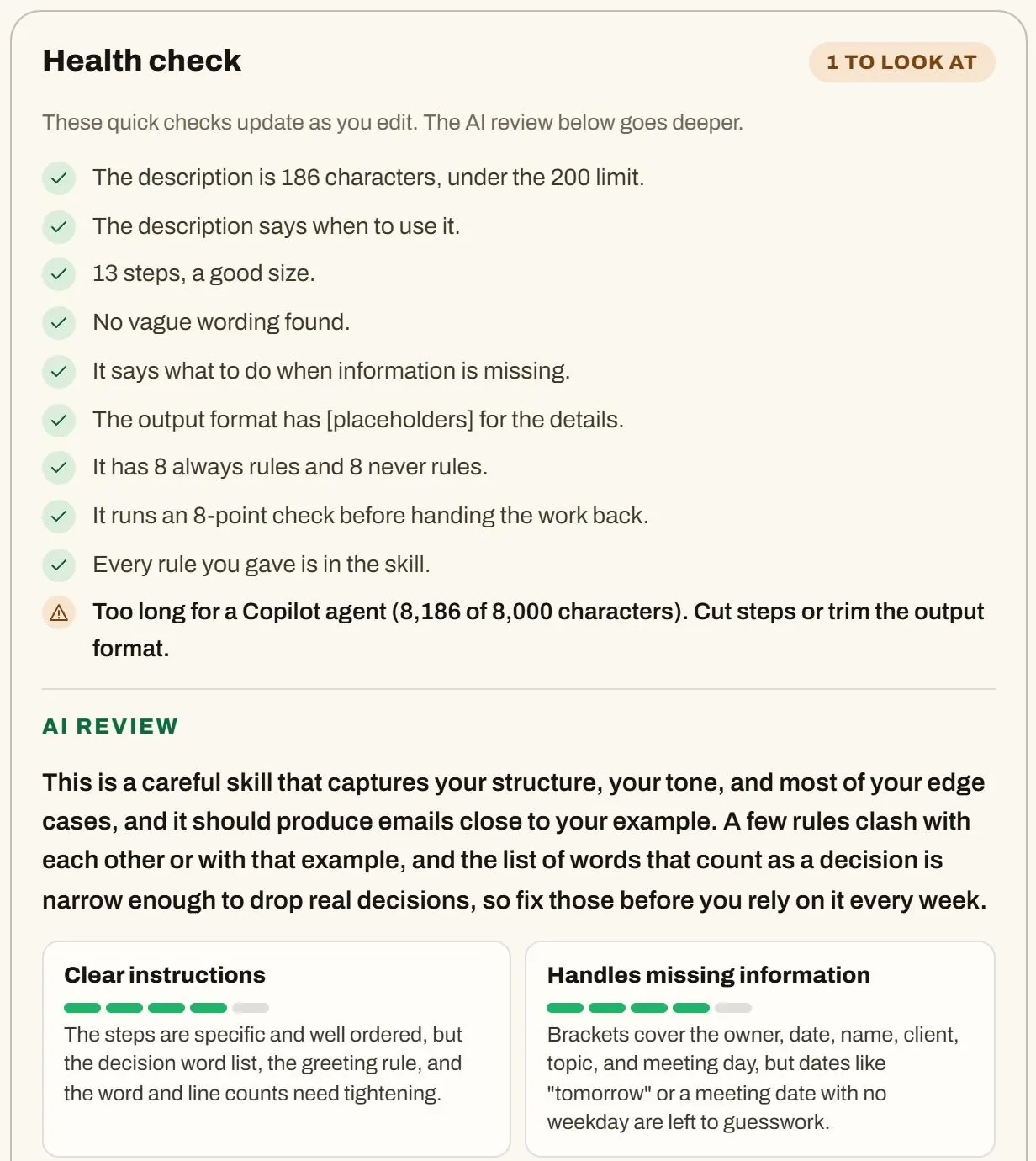
The quick checks and the AI review for the made-up skill. Screenshot from the tool's made-up example. Step 6
Test it on three inputs
An ordinary input, one with something missing, and a tricky one, each with what to check. If something is off, say what to change in plain words and the skill updates its own instructions. Your feedback can be about one test or all three.
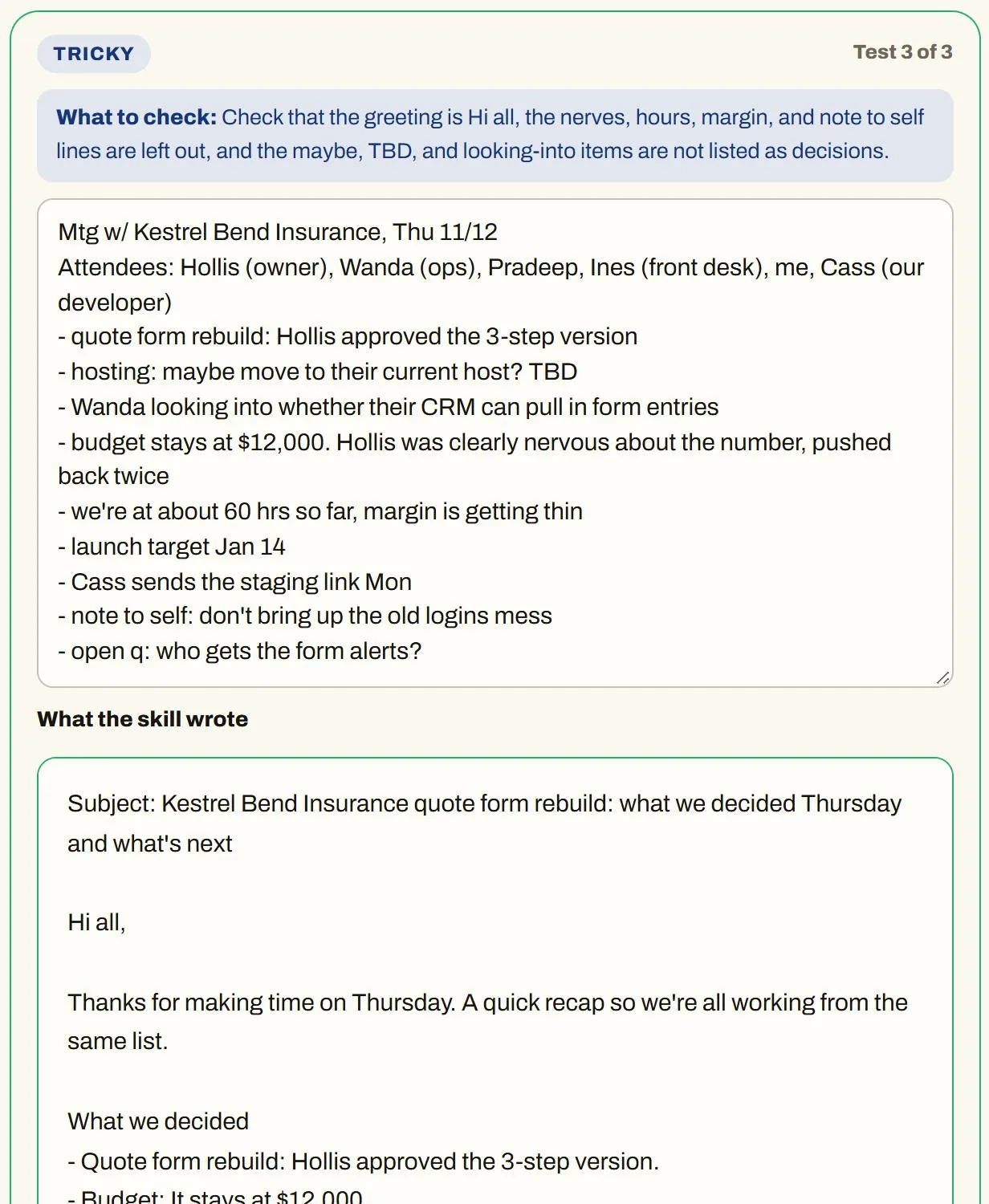
The tricky test: the skill left out the private lines and said so. Screenshot from the tool's made-up example. Step 7
See it next to a plain request
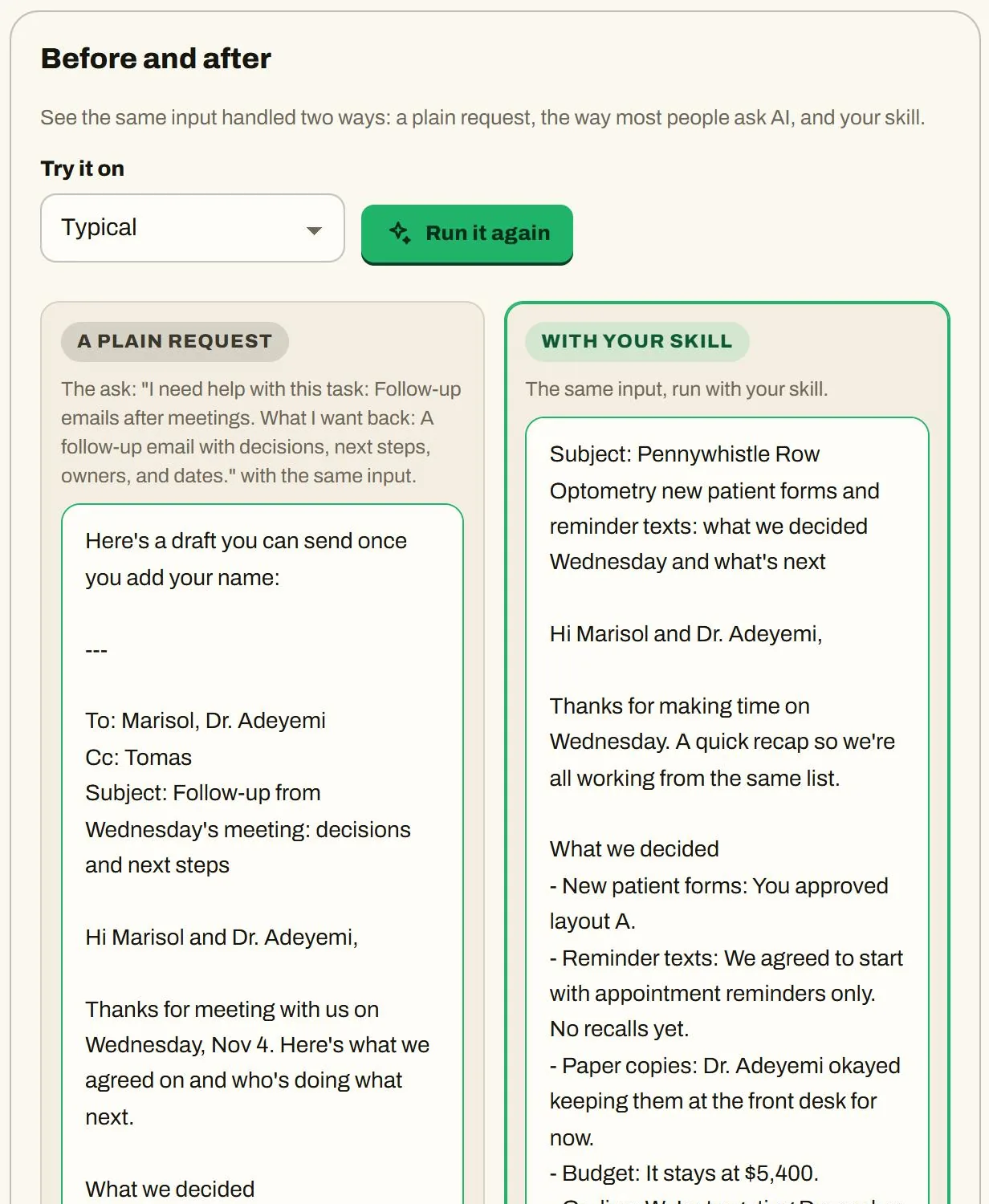
Skill Builder runs the same input as a plain request, the way most people ask AI, and shows it beside the skill's result. It also lists which steps of your skill shaped the result.
A plain request and the skill's result for the same input. Screenshot from the tool's made-up example. Step 8
Install it in your AI
Download the skill file for Claude, ChatGPT, or Gemini, or copy the boxes for a Copilot agent. Each box shows its character count, and the Copilot boxes show their limits. The install step lists the setup steps for each tool, which were checked against each company's help pages on October 7, 2026.
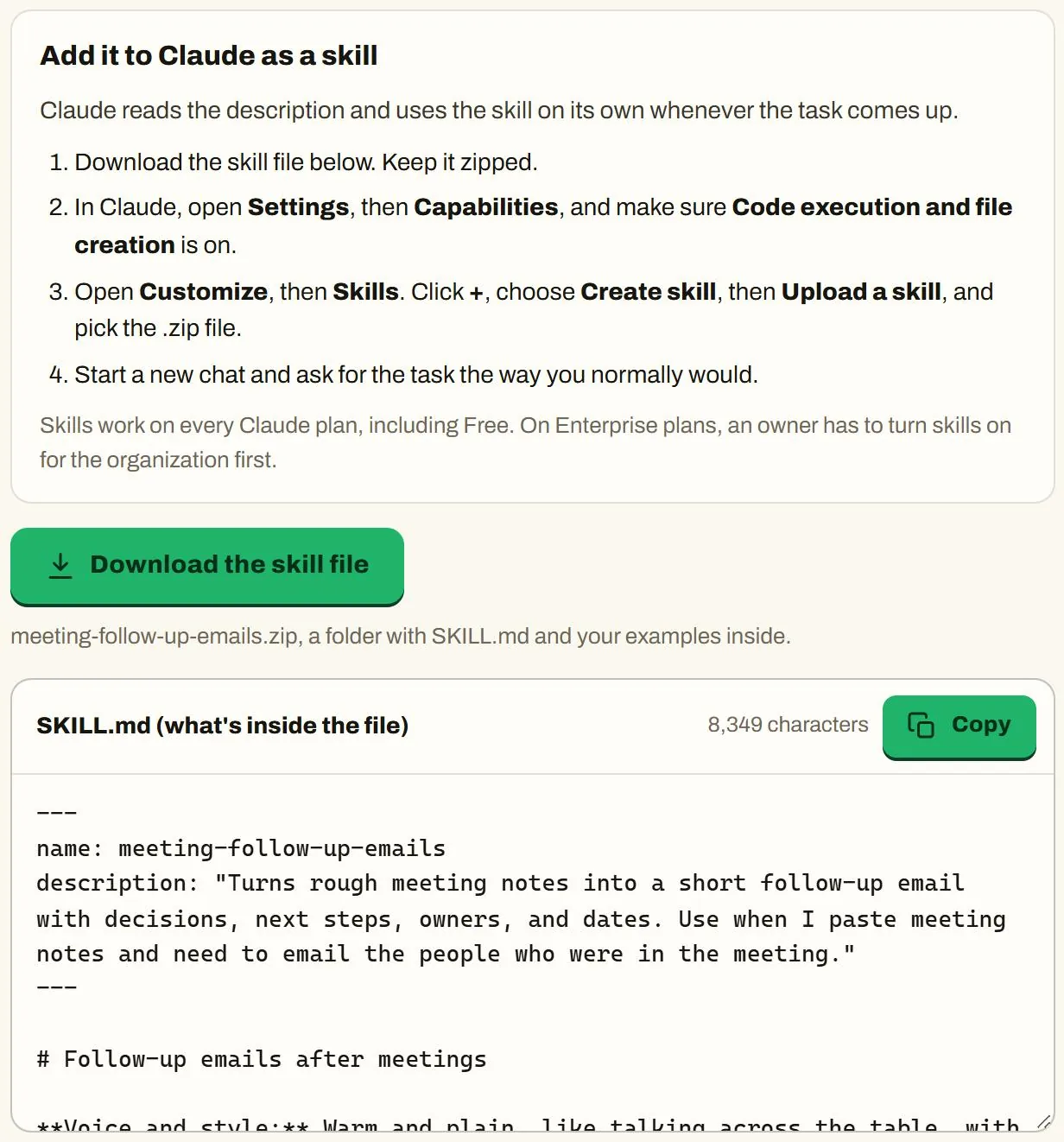
The install step for Claude. Screenshot from the tool's made-up example. Step 9
Hand it to your team
Skill Builder writes a short Word handout for teammates: when to use the skill, what to give it, how to use it step by step, what to check before sending, tips, and common mistakes. The file adds the setup steps for all four AI tools, the before and after, and the skill's instructions to paste. It also drafts a short message to send with it.
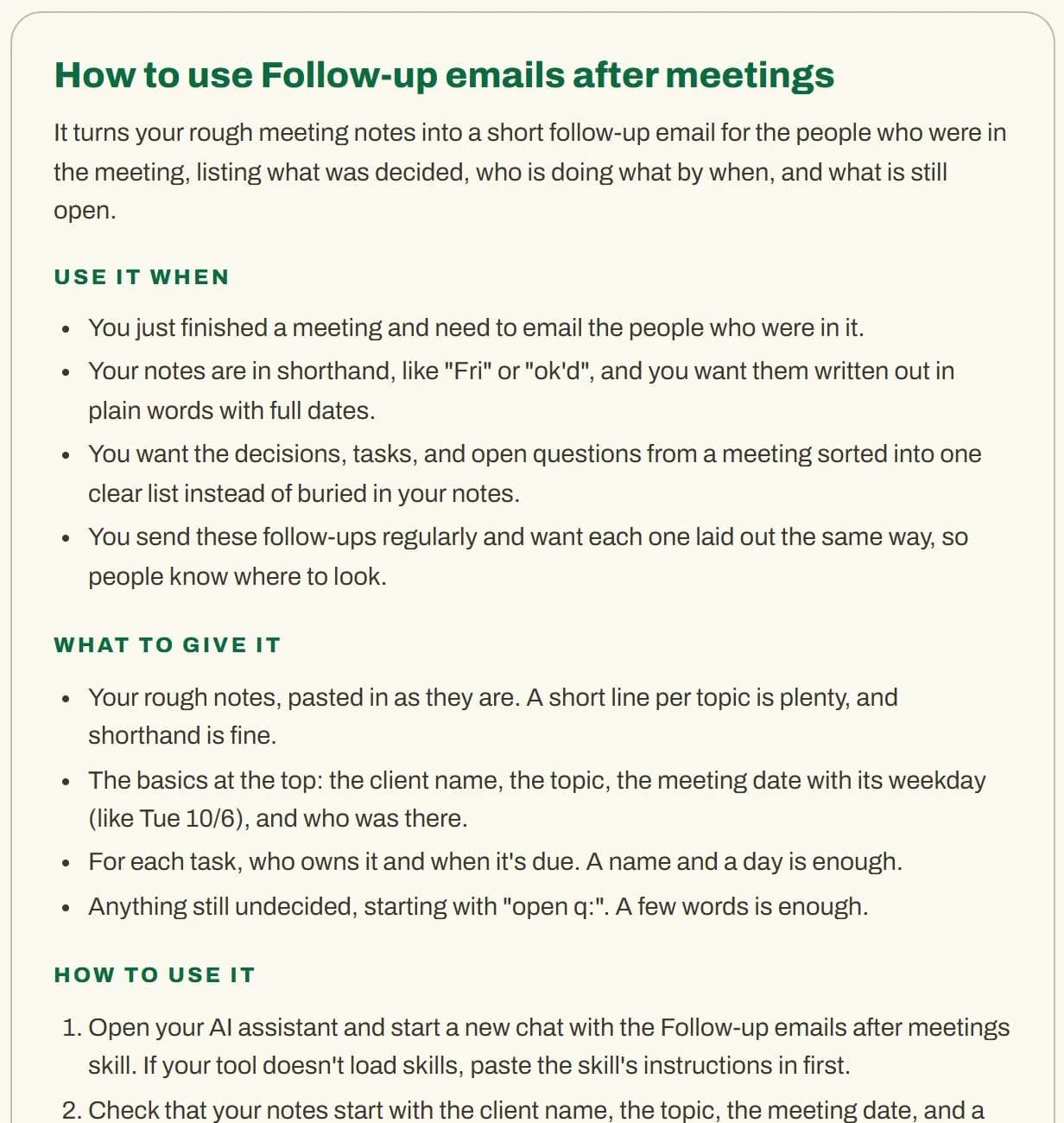
The team handout for the made-up skill. Screenshot from the tool's made-up example.
What the built-in example shows
The example is a made-up task: a weekly follow-up email after client meetings. The person, the notes, and the answers are invented. The AI's answers came from Claude, running the tool's own prompts.
- →It noticed what the finished email did that the notes didn't say: it turned a bare "Thu" into a full date, added an offer the notes never made, and filed a task under the decisions. Then it asked about each one.
- →The health check found that a rule against new promises sat right next to a required closing line that makes one, and that "keep every date exactly as written" clashed with the step that turns "Fri" into a full date. It also flagged that the skill was over Copilot's 8,000-character limit for instructions.
- →In the tricky test, the notes included how the owner seemed, the team's hours and margin, and a note to self. The skill left all of it out and said so.
- →On the same notes, a plain request came back at 285 words with a preface, To and Cc lines, and a deadline the notes never gave. The skill's version was 161 words, in the person's own format.
Use Skill Builder when
- →You've explained the same task to an AI more than twice.
- →You do the task on a schedule, like every week, and you care how it sounds.
- →More than one person does the task and you want it done the same way.
- →You have a finished piece you're proud of, or you can answer six questions about how you do it.
Skip Skill Builder when
- →The task is a one-off.
- →You want an automation that connects your apps. Skill Builder writes instructions for a chat tool and doesn't connect to anyone's accounts.
- →The task depends on private details you can't share with an AI. Leave them out, or don't use the tool for that task.
Skill Builder pricing
These are one-time prices in US dollars.
One person
$49
A one-time price for one person.
Team of up to 25
$299
A one-time price for a team of up to 25 people.
Both tools together: $179. Skill Builder for one person and Where AI Fits for one organization, bought together.
To get access, schedule a call or email Hank.
What you need to use Skill Builder
- →A web browser and an account with at least one AI tool.
- →Claude: skills are available on Free, Pro, Max, Team, and Enterprise plans, and need code execution turned on. On Team and Enterprise plans, an owner controls whether skills and code execution are on.
- →ChatGPT: skills are available to eligible Business, Enterprise, Healthcare, and Edu users, depending on workspace settings. On other plans, or if ChatGPT does not accept the .zip file, paste the instructions into a project or the start of a chat.
- →Gemini: you create skills with a personal Google Account, aged 18 or over, with Keep Activity on. Work and school accounts keep Gems until Google moves them over, in March 2027 for business, enterprise, and nonprofit accounts and June 2027 for education accounts.
- →Microsoft Copilot: agent instructions stop at 8,000 characters, and Skill Builder warns you when a skill is longer.
What to know before you use Skill Builder
- →Skill Builder is new, so expect rough edges and tell Hank what you find.
- →The health check is an AI reviewing AI's work. It catches vague wording, rules that clash, and gaps, and the quick checks are plain rules. Neither one proves the skill works. The three tests and the side-by-side are there so you can judge for yourself.
- →The side-by-side compares the skill with a plain request. If you already write a long, careful prompt each time, you'll see a smaller gap.
- →The setup steps for each AI tool change often. They were checked against each company's help pages on October 7, 2026, so check them against what's on your screen.
- →OpenAI's help page doesn't say which file format ChatGPT's skill upload accepts. Skill Builder gives ChatGPT the same .zip skill file it gives Claude and Gemini, so if ChatGPT does not accept it, paste the instructions into a project instead.
- →Your skills are saved in your own browser. Clearing browser data clears them, so download the skill file when it's done.
- →What you describe goes to the AI you choose, so leave out client names and private details.
Questions people ask
What is an AI skill?
A skill is a saved set of instructions, and sometimes examples, that an AI follows whenever you ask for a certain task. You write it once instead of explaining the task every time.
How is Skill Builder different from asking Claude or ChatGPT to make a skill?
ChatGPT can create a skill for you in a chat, and Claude, Gemini, and Copilot each have their own way to create one. Skill Builder adds a set of eight questions you answer first, an example of what bad looks like, a health check, three test inputs, a side-by-side with a plain request, packaging for all four AI tools, and a handout for your team.
Which AI tools does Skill Builder work with?
Skill Builder works with Claude, ChatGPT, Gemini, and Microsoft Copilot, and packages the finished skill for each one. Inside Claude, it asks Claude directly. Anywhere else, it gives you each prompt to paste into the AI you use, and you paste the answer back.
Do I need a paid AI plan to use a Skill Builder skill?
It depends on where you install the skill Skill Builder writes. Claude skills work on every plan, including Free. ChatGPT skills are available to eligible Business, Enterprise, Healthcare, and Edu users, so on other plans you paste the instructions into a project or chat. Gemini skills need a personal Google Account right now. The plan details are listed above, with links to each company's page.
What kinds of tasks work best in Skill Builder?
Skill Builder works best on tasks you repeat where the result is text: follow-up emails, job posts, replies to customers, summaries, grant sections, and reports. Skill Builder isn't an automation tool, and it doesn't connect to your accounts.
How do I know a Skill Builder skill works?
Skill Builder tests the skill on three inputs: an ordinary one, one with something missing, and a tricky one. Each comes with what to check. The side-by-side with a plain request shows what the skill changed, and you can teach the skill corrections in plain words. None of this proves the skill will work every time, so keep reading what it writes.
Can my team use the same Skill Builder skill?
Yes. Send your team the skill file or the instructions Skill Builder writes. The handout explains when to use the skill, what to give it, how to use it, and what to check before sending.
Does Skill Builder store my information?
Skill Builder saves your work only in your own browser and can't send anything anywhere itself. What you write goes to the AI you use, which is Claude when the tool runs inside Claude, or whichever AI you paste a prompt into. Leave out client names and private details.
How much does Skill Builder cost?
Skill Builder costs $49 per person as a one-time price, or $299 for a team of up to 25. Skill Builder and Where AI Fits together cost $179. To get access, schedule a call or email Hank.
Sources and checks
- What are skills? (Claude Help Center)Checked October 7, 2026
- Use skills in Claude (Claude Help Center)Checked October 7, 2026
- Skills in ChatGPT (OpenAI Help Center)Checked October 7, 2026
- Create and manage skills for Gemini Apps (Gemini Apps Help)Checked October 7, 2026
- About the transition from Gems to skills (Gemini Apps Help)Checked October 7, 2026
- Build agents in Agent Builder (Microsoft Learn)Checked October 7, 2026
Put this to work with your team
I'm Hank Barker, founder of PriorAIty. I help Michigan teams build useful AI habits through hands-on training and adoption consulting, with in-person and virtual options. I built Skill Builder from that work.
Keep going
- Where AI Fits
Find which tasks to start with, then turn each one into a skill with Skill Builder.
- Team Enablement Program
Build playbooks and prompt libraries with your team over several weeks.
- Role-Based Workshop Series
Hands-on sessions by department, built around each team's real tasks.
- The Claude Skills Playbook
The one required file, the nine skill categories, and how to build your own. A plain-English playbook for Claude Skills.
- Teach AI its part of your workflow
Map the process, define the AI role and output standard, then use varied tests, specific corrections, and a saved operating record.
- Which AI For Which Job
Claude, ChatGPT, Gemini, and Copilot win four different jobs. The honest breakdown, plus the pro move of using two on purpose.
Weekly AI guide
The Weekly AI Guide
One genuinely useful AI use case a week, whatever news matters, and what I've got coming up: free sessions, new guides, upcoming trainings.